
Who is who, instead of colors, is ranked

Quote from kurio on February 27, 2026, 1:03 pmIs it possible to add a word next to the avatar, for example, under the username, indicating their rank. Simply Administrator, Moderator, or Newbie?
The colors that designate administrator and moderator don’t mean much. Wouldn’t it be better to represent them by rank? For example:1 star – newbie;
2 stars – junior;
3 stars – senior
etc…
Do we just have to have stars in our eyes? 🙂
Is it possible to add a word next to the avatar, for example, under the username, indicating their rank. Simply Administrator, Moderator, or Newbie?
The colors that designate administrator and moderator don’t mean much. Wouldn’t it be better to represent them by rank? For example:
1 star – newbie;
2 stars – junior;
3 stars – senior
etc…
Do we just have to have stars in our eyes? 🙂
Uploaded files: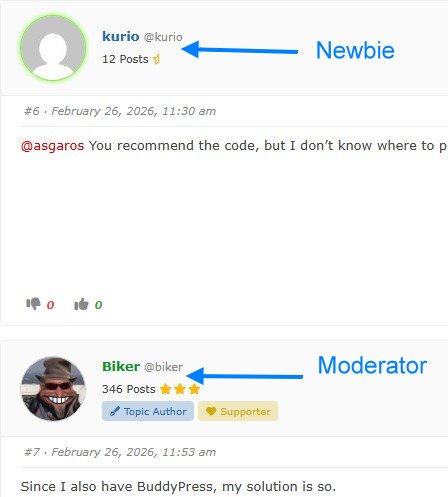

Quote from Biker on February 27, 2026, 5:15 pmGo to the Backend Forum/Settings/Reputation
Activate Reputation: set the hook..
Go to the Backend Forum/Settings/Reputation
Activate Reputation: set the hook..
Only a biker knows why a dog sticks its head out a car window.
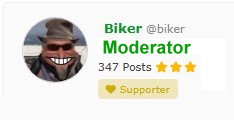
Quote from kurio on February 28, 2026, 10:32 am@biker I’ve marked it with a checkmark, but I want the following text to appear next to the avatar: For example, when I see your post, it should say MODERATOR under your post: Biker
@bikerLet me give you an example, a bit funny but true 🙂
How will a colorblind person know who you are if they can’t distinguish colors?Wouldn’t it look better this way?
@biker I’ve marked it with a checkmark, but I want the following text to appear next to the avatar: For example, when I see your post, it should say MODERATOR under your post: Biker
@biker
Let me give you an example, a bit funny but true 🙂
How will a colorblind person know who you are if they can’t distinguish colors?
Wouldn’t it look better this way?
Uploaded files:
Quote from Biker on March 2, 2026, 8:52 amSorry, didn’t read your entrance post right.
You usually like here with www.chopper-motorrad.de ….
Here the Member Icke has 2 ranks. Banana Joe und Member
Go to the backend/forum/user groups
There you can create individual user groups.
Then you can select the users who should enter this group.
You can then do this under User under Wordpress for each individual user, because the ranks can be selected there.
Sorry, didn’t read your entrance post right.
You usually like here with http://www.chopper-motorrad.de ….
Here the Member Icke has 2 ranks. Banana Joe und Member
Go to the backend/forum/user groups
There you can create individual user groups.
Then you can select the users who should enter this group.
You can then do this under User under Wordpress for each individual user, because the ranks can be selected there.
Only a biker knows why a dog sticks its head out a car window.
Quote from kurio on March 2, 2026, 3:54 pmHi 🙂
I’ll make a copy of my forum page and try what you suggested on the other server. Interesting solution. How did you add the motorcycle icon before Member?
Hi 🙂
I’ll make a copy of my forum page and try what you suggested on the other server. Interesting solution. How did you add the motorcycle icon before Member?