Warnings after defining user groups

Quote from AlfonsD on May 14, 2021, 5:01 pmAfter defining my own user groups (and deleting a predefines usergroup) the following warnings are displayed:
`Warning: preg_match(): Compilation failed: quantifier does not follow a repeatable item at offset 1 in /homepages/ … /wp-includes/class-wp.php on line 223
Warning: preg_match(): Compilation failed: quantifier does not follow a repeatable item at offset 1 in /homepages/ … /wp-includes/class-wp.php on line 224
Warning: Cannot modify header information – headers already sent by (output started at /homepages/ … /wp-includes/class-wp.php:223) in /homepages/ … /wp-includes/pluggable.php on line 1329
Warning: Cannot modify header information – headers already sent by (output started at /homepages/… /wp-includes/class-wp.php:223) in /homepages/… /wp-includes/pluggable.php on line 1332`
My Question: What can I do, to get rid of this messages, displayed on each page?
After defining my own user groups (and deleting a predefines usergroup) the following warnings are displayed:
`Warning: preg_match(): Compilation failed: quantifier does not follow a repeatable item at offset 1 in /homepages/ … /wp-includes/class-wp.php on line 223
Warning: preg_match(): Compilation failed: quantifier does not follow a repeatable item at offset 1 in /homepages/ … /wp-includes/class-wp.php on line 224
Warning: Cannot modify header information – headers already sent by (output started at /homepages/ … /wp-includes/class-wp.php:223) in /homepages/ … /wp-includes/pluggable.php on line 1329
Warning: Cannot modify header information – headers already sent by (output started at /homepages/… /wp-includes/class-wp.php:223) in /homepages/… /wp-includes/pluggable.php on line 1332`
My Question: What can I do, to get rid of this messages, displayed on each page?

Quote from qualmy91 on May 15, 2021, 10:50 amHey @alfonsd,
First of all it’s important to know that it is only a warning and not an error. You should make sure to deactivate the debug mode in WordPress before publishing.
In most of the cases it’s enough to go to “Settings”->”Permalinks” and Change to “plain” and back to your mode. Do you use a custom permalink or one of the default ones. If you use a custom structure, please post it here so I can have a look.
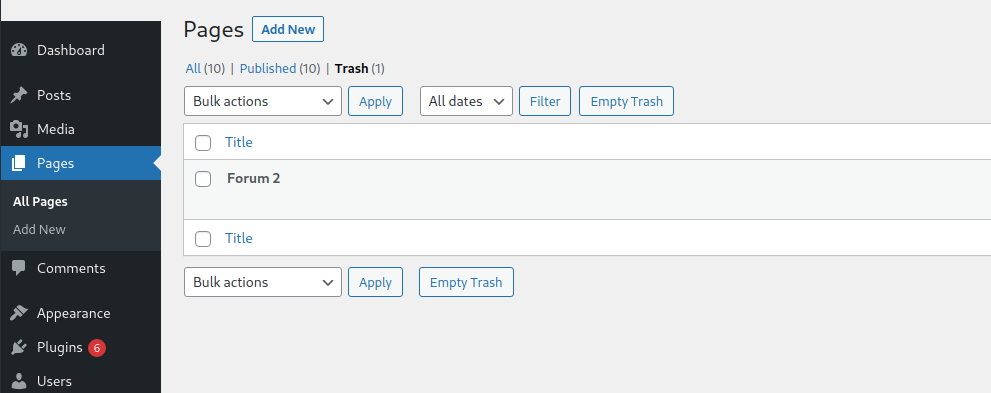
I’ve also found a bug and I’ll push this to GitHub so we can add it to the next update. Can you please check if you have a page with a forum shortcode in the trash? (Check the Screenshot)
It’s also important to check if this warning will also be shown if all other plugins are deactivated and you are using a basic theme. You can do this easily by using https://wordpress.org/plugins/health-check/. Activate this plugin and head to “Plugins” you only have to click troublehsoot next to Asgaros Forum and all ohter plugins are deactivated. This will only be affect you, but not your visitors.
Hey @alfonsd,
First of all it’s important to know that it is only a warning and not an error. You should make sure to deactivate the debug mode in WordPress before publishing.
In most of the cases it’s enough to go to “Settings”->”Permalinks” and Change to “plain” and back to your mode. Do you use a custom permalink or one of the default ones. If you use a custom structure, please post it here so I can have a look.
I’ve also found a bug and I’ll push this to GitHub so we can add it to the next update. Can you please check if you have a page with a forum shortcode in the trash? (Check the Screenshot)
It’s also important to check if this warning will also be shown if all other plugins are deactivated and you are using a basic theme. You can do this easily by using https://wordpress.org/plugins/health-check/. Activate this plugin and head to “Plugins” you only have to click troublehsoot next to Asgaros Forum and all ohter plugins are deactivated. This will only be affect you, but not your visitors.
Uploaded files: