
Hide block in editor, URL insert

Quote from serprj on November 21, 2020, 10:17 pmHi,
How to switch off search in pages function / block , when inserting URL?
I dont want to show many pages from users, i even dont want to let them know about it.
if it isnt possible as is, can I use different editor for forum?
Screenshot added.
Thx.
Hi,
How to switch off search in pages function / block , when inserting URL?
I dont want to show many pages from users, i even dont want to let them know about it.
if it isnt possible as is, can I use different editor for forum?
Screenshot added.
Thx.
Uploaded files: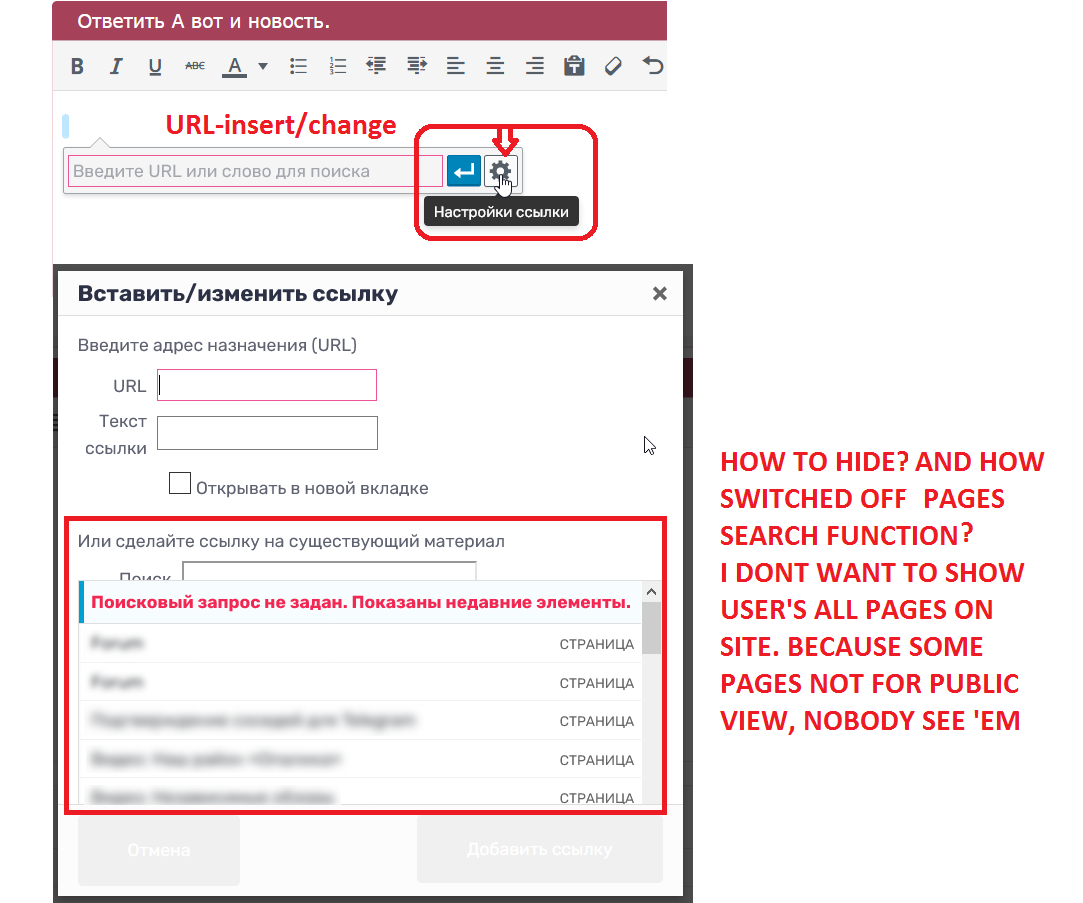

Quote from Veronica on November 27, 2020, 1:31 amYou can add:
#wplink-link-existing-content {
display: none !important;
}
#search-panel {
display: none !important;
}
#wp-link-wrap {
height: 300px !important;
}to Forum -> Appearance -> Custom CSS
and after saving also clear your browser file cache
You can add:
#wplink-link-existing-content {
display: none !important;
}
#search-panel {
display: none !important;
}
#wp-link-wrap {
height: 300px !important;
}
to Forum -> Appearance -> Custom CSS
and after saving also clear your browser file cache
Quote from serprj on November 30, 2020, 3:07 pmQuote from Veronica on November 27, 2020, 1:31 amYou can add:
#wplink-link-existing-content {
display: none !important;
}
#search-panel {
display: none !important;
}
#wp-link-wrap {
height: 300px !important;
}to Forum -> Appearance -> Custom CSS
and after saving also clear your browser file cache
It’s just hide on page,
cosmetic effect, not exactly what I was looking for. Its still there, just hidden. I was hoping there is some kind hook.Anyway, Thanks a lot for answer. =)
Quote from Veronica on November 27, 2020, 1:31 amYou can add:
#wplink-link-existing-content {
display: none !important;
}
#search-panel {
display: none !important;
}
#wp-link-wrap {
height: 300px !important;
}to Forum -> Appearance -> Custom CSS
and after saving also clear your browser file cache
It’s just hide on page,
cosmetic effect, not exactly what I was looking for. Its still there, just hidden. I was hoping there is some kind hook.
Anyway, Thanks a lot for answer. =)
Quote from Veronica on December 1, 2020, 11:34 amYes and you asked for “Hide block …” in your subject.
Reconfiguring the Wordpress editor TinyMCE you should use this plugin:
https://wordpress.org/plugins/advanced-tinymce-configuration/
Yes and you asked for “Hide block …” in your subject.
Reconfiguring the Wordpress editor TinyMCE you should use this plugin:
https://wordpress.org/plugins/advanced-tinymce-configuration/
Quote from serprj on December 9, 2020, 4:01 pmQuote from Veronica on December 1, 2020, 11:34 amYes and you asked for “Hide block …” in your subject.
Reconfiguring the Wordpress editor TinyMCE you should use this plugin:
https://wordpress.org/plugins/advanced-tinymce-configuration/
Yeah. You right, my fault. Anyway thx for answers.
Quote from Veronica on December 1, 2020, 11:34 amYes and you asked for “Hide block …” in your subject.
Reconfiguring the Wordpress editor TinyMCE you should use this plugin:
https://wordpress.org/plugins/advanced-tinymce-configuration/
Yeah. You right, my fault. Anyway thx for answers.