
Asgaros Forum Thread-Status-Labels

Quote from Biker on July 10, 2026, 4:33 pmAsgaros Forum Thread-Status-Labels
Ein komplettes Tutorial für die Integration von Status-Labels in Asgaros Forum
⚠️ Wichtiger Hinweis / Important Notice
Deutsch
Vor der Durchführung der folgenden Schritte beachten Sie bitte:
Sicherungspflicht: Erstellen Sie vor jeder Änderung an Ihrer WordPress-Installation ein vollständiges Backup Ihrer Datenbank und aller Dateien. Dies ist unerlässlich, um im Falle von Problemen den ursprünglichen Zustand wiederherstellen zu können.
Haftungsausschluss: Diese Anleitung wird nach bestem Wissen und Gewissen erstellt und in einer laufenden WordPress-Installation getestet. Dennoch übernehme ich keinerlei Gewähr für die Richtigkeit, Vollständigkeit oder Aktualität der bereitgestellten Informationen. Die Nutzung und Umsetzung der Anleitung erfolgt ausschließlich auf eigene Gefahr und Verantwortung des Anwenders.
Keine Garantie: Ich übernehme keine Garantie für die Funktionalität des Codes in Ihrer spezifischen Umgebung. Unterschiedliche WordPress-Konfigurationen, Serverumgebungen und installierte Plugins können zu abweichendem Verhalten führen.
Haftungsausschluss für Schäden: Ich hafte nicht für direkte, indirekte, zufällige oder Folgeschäden, die durch die Nutzung oder Nichtnutzung der bereitgestellten Informationen und Code-Snippets entstehen.
English
Before performing the following steps, please note:
Backup Required: Create a complete backup of your WordPress database and all files before making any changes to your WordPress installation. This is essential to restore the original state in case of problems.
Disclaimer: This guide has been prepared to the best of my knowledge and tested on a live WordPress installation. However, I assume no liability for the accuracy, completeness, or timeliness of the information provided. The use and implementation of this guide is solely at your own risk and responsibility.
No Warranty: I provide no warranty for the functionality of the code in your specific environment. Different WordPress configurations, server environments, and installed plugins may lead to unexpected behavior.
Limitation of Liability: I shall not be liable for any direct, indirect, incidental, or consequential damages arising from the use or non-use of the provided information and code snippets.
Durch die Nutzung dieser Anleitung erklären Sie sich mit den oben genannten Bedingungen einverstanden. / By using this guide, you agree to the above terms.
Inhaltsverzeichnis / Table of Contents
Einleitung / Introduction
Datenbank-Änderungen / Database Changes
Code-Integration / Code Integration
Verwendung / Usage
Einleitung / Introduction
Deutsch
Dieses Tutorial zeigt, wie man ein Thread-Status-Label-System für das Asgaros Forum WordPress-Plugin implementiert. Damit können Threads mit individuellen Status-Labels (z.B. “Offen”, “Verkauft”, “Erledigt”) versehen werden, die im Frontend angezeigt werden.
Bei mir hat diese Variante auf einer laufenden WordPress-Installation mit Asgaros Forum problemlos funktioniert. Der Code ist universell einsetzbar und wurde in der Praxis getestet.
Funktionen:
✅ Admin-Menü zur Verwaltung der Status-Labels
✅ Dropdown im Thread-Editor
✅ Status-Anzeige im Thread und in der Forums-Übersicht
✅ Berechtigungen (nur Author/Admin können Status ändern)
✅ Individuelle Farben für Hintergrund und Schrift
English
This tutorial shows how to implement a Thread Status Label System for the Asgaros Forum WordPress plugin. This allows threads to be tagged with individual status labels (e.g., “Open”, “Sold”, “Completed”) that are displayed in the frontend.
This variant has been successfully tested on a live WordPress installation with Asgaros Forum. The code is universal and has been proven in practice.
Features:
✅ Admin menu for managing status labels
✅ Dropdown in the thread editor
✅ Status display in threads and forum overview
✅ Permissions (only author/admin can change status)
✅ Individual background and text colors
Datenbank-Änderungen / Database Changes
Schritt 1 / Step 1: Tabelle
wp_forum_topicserweitern / Extend tablewp_forum_topicsSQL-Befehl / SQL Command:
sqlALTER TABLE `wp_forum_topics` ADD COLUMN `status` varchar(50) DEFAULT NULL;Erklärung / Explanation:
Die Tabelle
wp_forum_topicsist die Haupttabelle für Threads in Asgaros ForumThe table
wp_forum_topicsis the main table for threads in Asgaros ForumWir fügen eine Spalte
statushinzu, die den Status-Text speichertWe add a column
statusthat stores the status textHinweis / Note: Wenn Ihr Datenbank-Prefix nicht
wp_ist, ersetzen Siewp_durch Ihr Prefix (z.B.asgaros_,custom_, etc.). / If your database prefix is notwp_, replacewp_with your prefix (e.g.,asgaros_,custom_, etc.).
Code-Integration / Code Integration
Schritt 1 / Step 1: functions.php öffnen / Open functions.php
Die
functions.phpIhres WordPress-Themes befindet sich unter:
Thefunctions.phpof your WordPress theme is located at:text/wp-content/themes/ihr-theme/functions.phpWichtig / Important: Fügen Sie den gesamten Code NACH
<?phpund VOR dem schließenden?>(falls vorhanden) ein. / Add the entire code AFTER<?phpand BEFORE the closing?>(if present).
Schritt 2 / Step 2: Vollständigen Code einfügen / Add complete code
/**
* ================================================================
* ASGAROS FORUM – THREAD-STATUS-LABELS (KOMPLETT)
* ================================================================
* BEGINN DES STATUS-LABEL-BLOCKS
* ================================================================
*/// 1. ADMIN-MENÜ (UNTER “FORUM”)
add_action(‘admin_menu’, function() {
global $menu, $submenu;$forum_slug = null;
foreach ($menu as $position => $item) {
if ($item[0] === ‘Forum’) {
$forum_slug = $item[2];
break;
}
}if (!$forum_slug) {
$forum_slug = ‘asgarosforum’;
}add_submenu_page(
$forum_slug,
‘Status-Labels’,
‘Status-Labels’,
‘manage_options’,
‘af-status-labels’,
‘af_status_labels_page’
);
}, 999);// 2. ADMIN-SEITE
function af_status_labels_page() {
if (isset($_POST[‘save_labels’])) {
$labels = array();
if (isset($_POST[‘labels’]) && is_array($_POST[‘labels’])) {
foreach ($_POST[‘labels’] as $label) {
if (!empty($label[‘name’]) && !empty($label[‘color’])) {
$text_color = isset($label[‘text_color’]) ? sanitize_hex_color($label[‘text_color’]) : ‘#ffffff’;
$labels[] = array(
‘name’ => sanitize_text_field($label[‘name’]),
‘color’ => sanitize_hex_color($label[‘color’]),
‘text_color’ => $text_color
);
}
}
}
update_option(‘af_status_labels’, $labels);
echo ‘<div class=”notice notice-success”><p>Labels gespeichert.</p></div>’;
}$labels = get_option(‘af_status_labels’, array());
?>
<div class=”wrap”>
<h1>Status-Labels</h1>
<form method=”post”>
<table class=”form-table”>
<thead><tr><th>Name</th><th>Hintergrund</th><th>Schrift</th><th>Aktion</th></tr></thead>
<tbody id=”label-rows”>
<?php if (!empty($labels)): ?>
<?php foreach ($labels as $index => $label): ?>
<tr>
<td><input type=”text” name=”labels[<?php echo $index; ?>][name]” value=”<?php echo esc_attr($label[‘name’]); ?>” /></td>
<td><input type=”color” name=”labels[<?php echo $index; ?>][color]” value=”<?php echo esc_attr($label[‘color’]); ?>” /></td>
<td><input type=”color” name=”labels[<?php echo $index; ?>][text_color]” value=”<?php echo isset($label[‘text_color’]) ? esc_attr($label[‘text_color’]) : ‘#ffffff’; ?>” /></td>
<td><button type=”button” class=”button remove-label”>Entfernen</button></td>
</tr>
<?php endforeach; ?>
<?php else: ?>
<tr>
<td><input type=”text” name=”labels[0][name]” placeholder=”Offen” /></td>
<td><input type=”color” name=”labels[0][color]” value=”#28a745″ /></td>
<td><input type=”color” name=”labels[0][text_color]” value=”#ffffff” /></td>
<td><button type=”button” class=”button remove-label”>Entfernen</button></td>
</tr>
<?php endif; ?>
</tbody>
</table>
<p><button type=”button” class=”button” id=”add-label”>Weiteres Label</button></p>
<p><input type=”submit” name=”save_labels” class=”button button-primary” value=”Speichern” /></p>
</form>
</div>
<script>
jQuery(document).ready(function($) {
var rowIndex = <?php echo count($labels); ?>;
$(‘#add-label’).on(‘click’, function() {
var row = ‘<tr><td><input type=”text” name=”labels[‘ + rowIndex + ‘][name]” placeholder=”Neu” /></td><td><input type=”color” name=”labels[‘ + rowIndex + ‘][color]” value=”#ffc107″ /></td><td><input type=”color” name=”labels[‘ + rowIndex + ‘][text_color]” value=”#000000″ /></td><td><button type=”button” class=”button remove-label”>Entfernen</button></td></tr>’;
$(‘#label-rows’).append(row);
rowIndex++;
});
$(document).on(‘click’, ‘.remove-label’, function() {
$(this).closest(‘tr’).remove();
});
});
</script>
<?php
}// 3. STANDARD-LABELS SETZEN
add_action(‘init’, function() {
$labels = get_option(‘af_status_labels’, array());
if (empty($labels)) {
$labels = array(
array(‘name’ => ‘Offen’, ‘color’ => ‘#28a745’, ‘text_color’ => ‘#ffffff’),
array(‘name’ => ‘Verkauft’, ‘color’ => ‘#dc3545’, ‘text_color’ => ‘#ffffff’),
array(‘name’ => ‘Erledigt’, ‘color’ => ‘#17a2b8’, ‘text_color’ => ‘#ffffff’),
array(‘name’ => ‘Verkaufe’, ‘color’ => ‘#ffc107’, ‘text_color’ => ‘#000000’)
);
update_option(‘af_status_labels’, $labels);
}
});// 4. FUNKTION: PRÜFT OB USER DEN STATUS ÄNDERN DARF
function af_can_change_status($thread_id) {
if (current_user_can(‘manage_options’) || current_user_can(‘moderate_comments’)) {
return true;
}
if (!is_user_logged_in()) {
return false;
}
global $wpdb;
$author_id = $wpdb->get_var($wpdb->prepare(
“SELECT author_id FROM eu07zIe_forum_topics WHERE id = %d”,
$thread_id
));
return ($author_id == get_current_user_id());
}// 5. DROPDOWN IM EDITOR – NUR MIT BERECHTIGUNG
add_action(‘asgarosforum_editor_custom_content_bottom’, function() {
$labels = get_option(‘af_status_labels’, array());
if (empty($labels)) return;$post_id = 0;
$url = $_SERVER[‘REQUEST_URI’];
if (preg_match(‘/\/post-bearbeiten\/([0-9]+)\//’, $url, $matches)) {
$post_id = intval($matches[1]);
}
if (!$post_id && isset($_GET[‘id’])) {
$post_id = intval($_GET[‘id’]);
}$thread_id = 0;
if ($post_id) {
global $wpdb;
$thread_id = $wpdb->get_var($wpdb->prepare(
“SELECT parent_id FROM eu07zIe_forum_posts WHERE id = %d”,
$post_id
));
}if (!af_can_change_status($thread_id)) {
return;
}$current = ”;
if ($thread_id) {
$current = $wpdb->get_var($wpdb->prepare(
“SELECT status FROM eu07zIe_forum_topics WHERE id = %d”,
$thread_id
));
}
if ($current === null) {
$current = ”;
}
?>
<div style=”margin:15px 0; padding:10px; background:#f9f9f9; border:1px solid #ddd; border-radius:4px;”>
<label><strong>Status:</strong></label><br>
<select name=”af_status” id=”af-status” style=”width:100%; max-width:300px; padding:8px;”>
<option value=””>– Kein Status –</option>
<?php foreach ($labels as $label): ?>
<option value=”<?php echo esc_attr($label[‘name’]); ?>” <?php echo ($current === $label[‘name’]) ? ‘selected’ : ”; ?>><?php echo esc_html($label[‘name’]); ?></option>
<?php endforeach; ?>
</select>
</div>
<?php
});// 6. STATUS SPEICHERN – NUR MIT BERECHTIGUNG
add_action(‘asgarosforum_after_add_topic_submit’, ‘af_save_status_from_submit’, 10, 6);
add_action(‘asgarosforum_after_add_post_submit’, ‘af_save_status_from_submit’, 10, 6);
add_action(‘asgarosforum_after_edit_post_submit’, ‘af_save_status_from_submit’, 10, 6);function af_save_status_from_submit($post_id, $thread_id, $subject, $content, $link, $author_id) {
if (!isset($_POST[‘af_status’])) {
return;
}
if (!af_can_change_status($thread_id)) {
return;
}$status = sanitize_text_field($_POST[‘af_status’]);
global $wpdb;if (!empty($status)) {
$wpdb->update(
‘eu07zIe_forum_topics’,
array(‘status’ => $status),
array(‘id’ => $thread_id),
array(‘%s’),
array(‘%d’)
);
} else {
$wpdb->update(
‘eu07zIe_forum_topics’,
array(‘status’ => null),
array(‘id’ => $thread_id),
array(‘%s’),
array(‘%d’)
);
}
}// 7. HELPER: STATUS DATA HOLEN
function af_get_thread_status_data($thread_id) {
global $wpdb;
$status = $wpdb->get_var($wpdb->prepare(
“SELECT status FROM eu07zIe_forum_topics WHERE id = %d”,
$thread_id
));
if (empty($status)) return null;$labels = get_option(‘af_status_labels’, array());
$color = ‘#6c757d’;
$text_color = ‘#ffffff’;
foreach ($labels as $label) {
if ($label[‘name’] === $status) {
$color = $label[‘color’];
$text_color = isset($label[‘text_color’]) ? $label[‘text_color’] : ‘#ffffff’;
break;
}
}return array(
‘status’ => $status,
‘color’ => $color,
‘text_color’ => $text_color
);
}// 8. STATUS IM THREAD ANZEIGEN – NUR BEI class=”main-title main-title-topic”
add_action(‘wp’, function() {
$url = $_SERVER[‘REQUEST_URI’];
if (strpos($url, ‘/thema/’) === false) return;$slug = ”;
if (preg_match(‘/\/thema\/([^\/]+)\//’, $url, $matches)) {
$slug = $matches[1];
}
if (empty($slug)) return;global $wpdb;
$thread_id = $wpdb->get_var($wpdb->prepare(“SELECT id FROM eu07zIe_forum_topics WHERE slug = %s”, $slug));
if (!$thread_id) return;$data = af_get_thread_status_data($thread_id);
if (!$data) return;
if ($data[‘status’] === ‘Offen’) return;$badge = ‘<div class=”af-thread-status-label” style=”background:’ . esc_attr($data[‘color’]) . ‘;
color:’ . esc_attr($data[‘text_color’]) . ‘;
padding:4px 12px;
border-radius:4px;
font-size:14px;
font-weight:bold;
margin:10px 0 10px 15px;
display:inline-block;
box-shadow: 0 2px 4px rgba(0,0,0,0.1);”>
‘ . esc_html($data[‘status’]) . ‘
</div>’;// Output Buffer – NUR bei class=”main-title main-title-topic”
ob_start(function($buffer) use ($badge) {
$pattern = ‘/(<h1[^>]*class=”[^”]*main-title[^”]*main-title-topic[^”]*”[^>]*>.*?<\/h1>)/’;
$buffer = preg_replace_callback($pattern, function($matches) use ($badge) {
return $matches[1] . $badge;
}, $buffer);
return $buffer;
});// JavaScript Fallback
add_action(‘wp_footer’, function() use ($data) {
?>
<script>
(function() {
function insertLabel() {
if (document.querySelector(‘.af-thread-status-label’)) return;var h1 = document.querySelector(‘h1.main-title.main-title-topic’);
if (h1) {
var parent = h1.parentNode;
var label = document.createElement(‘div’);
label.className = ‘af-thread-status-label’;
label.style.cssText = ‘background:<?php echo esc_js($data[‘color’]); ?>; color:<?php echo esc_js($data[‘text_color’]); ?>; padding:4px 12px; border-radius:4px; font-size:14px; font-weight:bold; margin:10px 0 10px 15px; display:inline-block; box-shadow:0 2px 4px rgba(0,0,0,0.1);’;
label.textContent = ‘<?php echo esc_js($data[‘status’]); ?>’;
parent.insertBefore(label, h1.nextSibling);
}
}insertLabel();
setTimeout(insertLabel, 100);
setTimeout(insertLabel, 300);
setTimeout(insertLabel, 600);
setTimeout(insertLabel, 1000);
setTimeout(insertLabel, 2000);if (document.readyState === ‘loading’) {
document.addEventListener(‘DOMContentLoaded’, insertLabel);
}
})();
</script>
<?php
}, 999);
}, 1);// 9. STATUS IN DER FORUMS-ÜBERSICHT ANZEIGEN
add_action(‘wp’, function() {
$url = $_SERVER[‘REQUEST_URI’];
if (strpos($url, ‘/thema/’) !== false) return;
if (strpos($url, ‘/chopperforum/’) === false) return;ob_start(function($buffer) {
$pattern = ‘/(<a[^>]*href=”[^”]*\/thema\/([^\/”]+)\/”[^>]*>[^<]*<\/a>)/’;$buffer = preg_replace_callback($pattern, function($matches) {
$link = $matches[1];
$slug = $matches[2];global $wpdb;
$thread_id = $wpdb->get_var($wpdb->prepare(“SELECT id FROM eu07zIe_forum_topics WHERE slug = %s”, $slug));
if (!$thread_id) return $link;$data = af_get_thread_status_data($thread_id);
if (!$data) return $link;$show_in_overview = array(‘Verkaufe’, ‘Verkauft’, ‘Erledigt’, ‘Reserviert’, ‘Geschlossen’);
if (!in_array($data[‘status’], $show_in_overview)) {
return $link;
}$badge = ‘ <span class=”af-thread-status-label” style=”background:’ . esc_attr($data[‘color’]) . ‘;
color:’ . esc_attr($data[‘text_color’]) . ‘;
padding:2px 8px;
border-radius:3px;
font-size:10px;
font-weight:bold;
margin-left:5px;
display:inline-block;
vertical-align:middle;
line-height:1.4;”>
‘ . esc_html($data[‘status’]) . ‘
</span>’;return $link . $badge;
}, $buffer);
return $buffer;
});
}, 2);// 10. CSS
add_action(‘wp_head’, function() {
$url = $_SERVER[‘REQUEST_URI’];
if (strpos($url, ‘/chopperforum/’) !== false || strpos($url, ‘/thema/’) !== false) {
echo ‘<style>
.af-thread-status-label {
display: inline-block;
padding: 4px 12px;
border-radius: 4px;
font-size: 0.85em;
font-weight: bold;
color: #fff;
line-height: 1.4;
}@media only screen and (max-width: 768px) {
.af-thread-status-label {
font-size: 11px !important;
padding: 3px 10px !important;
margin: 8px 0 8px 10px !important;
display: inline-block !important;
}
}@media only screen and (max-width: 480px) {
.af-thread-status-label {
font-size: 9px !important;
padding: 2px 6px !important;
margin: 6px 0 6px 8px !important;
}
}
</style>’;
}
});/**
* ================================================================
* ENDE DES STATUS-LABEL-BLOCKS
* ================================================================
*/
Verwendung / Usage
Deutsch
1. Admin-Bereich
Gehen Sie zu Forum → Status-Labels
Fügen Sie neue Labels hinzu oder bearbeiten Sie bestehende
Wählen Sie Hintergrund- und Schriftfarbe
Speichern Sie Ihre Änderungen
2. Thread-Editor
Beim Erstellen/Bearbeiten eines Threads erscheint ein Dropdown
Nur Thread-Author und Admins können den Status ändern
Wählen Sie den gewünschten Status aus
3. Frontend-Anzeige
Thread-Ansicht: Status wird unter der Überschrift angezeigt
Forums-Übersicht: Status wird neben dem Thread-Titel angezeigt
English
1. Admin Area
Go to Forum → Status Labels
Add new labels or edit existing ones
Choose background and text color
Save your changes
2. Thread Editor
When creating/editing a thread, a dropdown appears
Only thread author and admins can change the status
Select the desired status
3. Frontend Display
Thread View: Status is displayed below the headline
Forum Overview: Status is displayed next to the thread title
Viel Erfolg mit Ihrem Status-Label-System! / Good luck with your status label system! 🚀
Asgaros Forum Thread-Status-Labels
Ein komplettes Tutorial für die Integration von Status-Labels in Asgaros Forum
⚠️ Wichtiger Hinweis / Important Notice
Deutsch
Vor der Durchführung der folgenden Schritte beachten Sie bitte:
-
Sicherungspflicht: Erstellen Sie vor jeder Änderung an Ihrer WordPress-Installation ein vollständiges Backup Ihrer Datenbank und aller Dateien. Dies ist unerlässlich, um im Falle von Problemen den ursprünglichen Zustand wiederherstellen zu können.
-
Haftungsausschluss: Diese Anleitung wird nach bestem Wissen und Gewissen erstellt und in einer laufenden WordPress-Installation getestet. Dennoch übernehme ich keinerlei Gewähr für die Richtigkeit, Vollständigkeit oder Aktualität der bereitgestellten Informationen. Die Nutzung und Umsetzung der Anleitung erfolgt ausschließlich auf eigene Gefahr und Verantwortung des Anwenders.
-
Keine Garantie: Ich übernehme keine Garantie für die Funktionalität des Codes in Ihrer spezifischen Umgebung. Unterschiedliche WordPress-Konfigurationen, Serverumgebungen und installierte Plugins können zu abweichendem Verhalten führen.
-
Haftungsausschluss für Schäden: Ich hafte nicht für direkte, indirekte, zufällige oder Folgeschäden, die durch die Nutzung oder Nichtnutzung der bereitgestellten Informationen und Code-Snippets entstehen.
English
Before performing the following steps, please note:
-
Backup Required: Create a complete backup of your WordPress database and all files before making any changes to your WordPress installation. This is essential to restore the original state in case of problems.
-
Disclaimer: This guide has been prepared to the best of my knowledge and tested on a live WordPress installation. However, I assume no liability for the accuracy, completeness, or timeliness of the information provided. The use and implementation of this guide is solely at your own risk and responsibility.
-
No Warranty: I provide no warranty for the functionality of the code in your specific environment. Different WordPress configurations, server environments, and installed plugins may lead to unexpected behavior.
-
Limitation of Liability: I shall not be liable for any direct, indirect, incidental, or consequential damages arising from the use or non-use of the provided information and code snippets.
Durch die Nutzung dieser Anleitung erklären Sie sich mit den oben genannten Bedingungen einverstanden. / By using this guide, you agree to the above terms.
Inhaltsverzeichnis / Table of Contents
-
Einleitung / Introduction
-
Datenbank-Änderungen / Database Changes
-
Code-Integration / Code Integration
-
Verwendung / Usage
Einleitung / Introduction
Deutsch
Dieses Tutorial zeigt, wie man ein Thread-Status-Label-System für das Asgaros Forum WordPress-Plugin implementiert. Damit können Threads mit individuellen Status-Labels (z.B. “Offen”, “Verkauft”, “Erledigt”) versehen werden, die im Frontend angezeigt werden.
Bei mir hat diese Variante auf einer laufenden WordPress-Installation mit Asgaros Forum problemlos funktioniert. Der Code ist universell einsetzbar und wurde in der Praxis getestet.
Funktionen:
-
✅ Admin-Menü zur Verwaltung der Status-Labels
-
✅ Dropdown im Thread-Editor
-
✅ Status-Anzeige im Thread und in der Forums-Übersicht
-
✅ Berechtigungen (nur Author/Admin können Status ändern)
-
✅ Individuelle Farben für Hintergrund und Schrift
English
This tutorial shows how to implement a Thread Status Label System for the Asgaros Forum WordPress plugin. This allows threads to be tagged with individual status labels (e.g., “Open”, “Sold”, “Completed”) that are displayed in the frontend.
This variant has been successfully tested on a live WordPress installation with Asgaros Forum. The code is universal and has been proven in practice.
Features:
-
✅ Admin menu for managing status labels
-
✅ Dropdown in the thread editor
-
✅ Status display in threads and forum overview
-
✅ Permissions (only author/admin can change status)
-
✅ Individual background and text colors
Datenbank-Änderungen / Database Changes
Schritt 1 / Step 1: Tabelle wp_forum_topics erweitern / Extend table wp_forum_topics
SQL-Befehl / SQL Command:
ALTER TABLE `wp_forum_topics` ADD COLUMN `status` varchar(50) DEFAULT NULL;
Erklärung / Explanation:
-
Die Tabelle
wp_forum_topicsist die Haupttabelle für Threads in Asgaros Forum -
The table
wp_forum_topicsis the main table for threads in Asgaros Forum -
Wir fügen eine Spalte
statushinzu, die den Status-Text speichert -
We add a column
statusthat stores the status text
Hinweis / Note: Wenn Ihr Datenbank-Prefix nicht wp_ ist, ersetzen Sie wp_ durch Ihr Prefix (z.B. asgaros_, custom_, etc.). / If your database prefix is not wp_, replace wp_ with your prefix (e.g., asgaros_, custom_, etc.).
Code-Integration / Code Integration
Schritt 1 / Step 1: functions.php öffnen / Open functions.php
Die functions.php Ihres WordPress-Themes befindet sich unter:
The functions.php of your WordPress theme is located at:
/wp-content/themes/ihr-theme/functions.php
Wichtig / Important: Fügen Sie den gesamten Code NACH <?php und VOR dem schließenden ?> (falls vorhanden) ein. / Add the entire code AFTER <?php and BEFORE the closing ?> (if present).
Schritt 2 / Step 2: Vollständigen Code einfügen / Add complete code
/**
* ================================================================
* ASGAROS FORUM – THREAD-STATUS-LABELS (KOMPLETT)
* ================================================================
* BEGINN DES STATUS-LABEL-BLOCKS
* ================================================================
*/
// 1. ADMIN-MENÜ (UNTER “FORUM”)
add_action(‘admin_menu’, function() {
global $menu, $submenu;
$forum_slug = null;
foreach ($menu as $position => $item) {
if ($item[0] === ‘Forum’) {
$forum_slug = $item[2];
break;
}
}
if (!$forum_slug) {
$forum_slug = ‘asgarosforum’;
}
add_submenu_page(
$forum_slug,
‘Status-Labels’,
‘Status-Labels’,
‘manage_options’,
‘af-status-labels’,
‘af_status_labels_page’
);
}, 999);
// 2. ADMIN-SEITE
function af_status_labels_page() {
if (isset($_POST[‘save_labels’])) {
$labels = array();
if (isset($_POST[‘labels’]) && is_array($_POST[‘labels’])) {
foreach ($_POST[‘labels’] as $label) {
if (!empty($label[‘name’]) && !empty($label[‘color’])) {
$text_color = isset($label[‘text_color’]) ? sanitize_hex_color($label[‘text_color’]) : ‘#ffffff’;
$labels[] = array(
‘name’ => sanitize_text_field($label[‘name’]),
‘color’ => sanitize_hex_color($label[‘color’]),
‘text_color’ => $text_color
);
}
}
}
update_option(‘af_status_labels’, $labels);
echo ‘<div class=”notice notice-success”><p>Labels gespeichert.</p></div>’;
}
$labels = get_option(‘af_status_labels’, array());
?>
<div class=”wrap”>
<h1>Status-Labels</h1>
<form method=”post”>
<table class=”form-table”>
<thead><tr><th>Name</th><th>Hintergrund</th><th>Schrift</th><th>Aktion</th></tr></thead>
<tbody id=”label-rows”>
<?php if (!empty($labels)): ?>
<?php foreach ($labels as $index => $label): ?>
<tr>
<td><input type=”text” name=”labels[<?php echo $index; ?>][name]” value=”<?php echo esc_attr($label[‘name’]); ?>” /></td>
<td><input type=”color” name=”labels[<?php echo $index; ?>][color]” value=”<?php echo esc_attr($label[‘color’]); ?>” /></td>
<td><input type=”color” name=”labels[<?php echo $index; ?>][text_color]” value=”<?php echo isset($label[‘text_color’]) ? esc_attr($label[‘text_color’]) : ‘#ffffff’; ?>” /></td>
<td><button type=”button” class=”button remove-label”>Entfernen</button></td>
</tr>
<?php endforeach; ?>
<?php else: ?>
<tr>
<td><input type=”text” name=”labels[0][name]” placeholder=”Offen” /></td>
<td><input type=”color” name=”labels[0][color]” value=”#28a745″ /></td>
<td><input type=”color” name=”labels[0][text_color]” value=”#ffffff” /></td>
<td><button type=”button” class=”button remove-label”>Entfernen</button></td>
</tr>
<?php endif; ?>
</tbody>
</table>
<p><button type=”button” class=”button” id=”add-label”>Weiteres Label</button></p>
<p><input type=”submit” name=”save_labels” class=”button button-primary” value=”Speichern” /></p>
</form>
</div>
<script>
jQuery(document).ready(function($) {
var rowIndex = <?php echo count($labels); ?>;
$(‘#add-label’).on(‘click’, function() {
var row = ‘<tr><td><input type=”text” name=”labels[‘ + rowIndex + ‘][name]” placeholder=”Neu” /></td><td><input type=”color” name=”labels[‘ + rowIndex + ‘][color]” value=”#ffc107″ /></td><td><input type=”color” name=”labels[‘ + rowIndex + ‘][text_color]” value=”#000000″ /></td><td><button type=”button” class=”button remove-label”>Entfernen</button></td></tr>’;
$(‘#label-rows’).append(row);
rowIndex++;
});
$(document).on(‘click’, ‘.remove-label’, function() {
$(this).closest(‘tr’).remove();
});
});
</script>
<?php
}
// 3. STANDARD-LABELS SETZEN
add_action(‘init’, function() {
$labels = get_option(‘af_status_labels’, array());
if (empty($labels)) {
$labels = array(
array(‘name’ => ‘Offen’, ‘color’ => ‘#28a745’, ‘text_color’ => ‘#ffffff’),
array(‘name’ => ‘Verkauft’, ‘color’ => ‘#dc3545’, ‘text_color’ => ‘#ffffff’),
array(‘name’ => ‘Erledigt’, ‘color’ => ‘#17a2b8’, ‘text_color’ => ‘#ffffff’),
array(‘name’ => ‘Verkaufe’, ‘color’ => ‘#ffc107’, ‘text_color’ => ‘#000000’)
);
update_option(‘af_status_labels’, $labels);
}
});
// 4. FUNKTION: PRÜFT OB USER DEN STATUS ÄNDERN DARF
function af_can_change_status($thread_id) {
if (current_user_can(‘manage_options’) || current_user_can(‘moderate_comments’)) {
return true;
}
if (!is_user_logged_in()) {
return false;
}
global $wpdb;
$author_id = $wpdb->get_var($wpdb->prepare(
“SELECT author_id FROM eu07zIe_forum_topics WHERE id = %d”,
$thread_id
));
return ($author_id == get_current_user_id());
}
// 5. DROPDOWN IM EDITOR – NUR MIT BERECHTIGUNG
add_action(‘asgarosforum_editor_custom_content_bottom’, function() {
$labels = get_option(‘af_status_labels’, array());
if (empty($labels)) return;
$post_id = 0;
$url = $_SERVER[‘REQUEST_URI’];
if (preg_match(‘/\/post-bearbeiten\/([0-9]+)\//’, $url, $matches)) {
$post_id = intval($matches[1]);
}
if (!$post_id && isset($_GET[‘id’])) {
$post_id = intval($_GET[‘id’]);
}
$thread_id = 0;
if ($post_id) {
global $wpdb;
$thread_id = $wpdb->get_var($wpdb->prepare(
“SELECT parent_id FROM eu07zIe_forum_posts WHERE id = %d”,
$post_id
));
}
if (!af_can_change_status($thread_id)) {
return;
}
$current = ”;
if ($thread_id) {
$current = $wpdb->get_var($wpdb->prepare(
“SELECT status FROM eu07zIe_forum_topics WHERE id = %d”,
$thread_id
));
}
if ($current === null) {
$current = ”;
}
?>
<div style=”margin:15px 0; padding:10px; background:#f9f9f9; border:1px solid #ddd; border-radius:4px;”>
<label><strong>Status:</strong></label><br>
<select name=”af_status” id=”af-status” style=”width:100%; max-width:300px; padding:8px;”>
<option value=””>– Kein Status –</option>
<?php foreach ($labels as $label): ?>
<option value=”<?php echo esc_attr($label[‘name’]); ?>” <?php echo ($current === $label[‘name’]) ? ‘selected’ : ”; ?>><?php echo esc_html($label[‘name’]); ?></option>
<?php endforeach; ?>
</select>
</div>
<?php
});
// 6. STATUS SPEICHERN – NUR MIT BERECHTIGUNG
add_action(‘asgarosforum_after_add_topic_submit’, ‘af_save_status_from_submit’, 10, 6);
add_action(‘asgarosforum_after_add_post_submit’, ‘af_save_status_from_submit’, 10, 6);
add_action(‘asgarosforum_after_edit_post_submit’, ‘af_save_status_from_submit’, 10, 6);
function af_save_status_from_submit($post_id, $thread_id, $subject, $content, $link, $author_id) {
if (!isset($_POST[‘af_status’])) {
return;
}
if (!af_can_change_status($thread_id)) {
return;
}
$status = sanitize_text_field($_POST[‘af_status’]);
global $wpdb;
if (!empty($status)) {
$wpdb->update(
‘eu07zIe_forum_topics’,
array(‘status’ => $status),
array(‘id’ => $thread_id),
array(‘%s’),
array(‘%d’)
);
} else {
$wpdb->update(
‘eu07zIe_forum_topics’,
array(‘status’ => null),
array(‘id’ => $thread_id),
array(‘%s’),
array(‘%d’)
);
}
}
// 7. HELPER: STATUS DATA HOLEN
function af_get_thread_status_data($thread_id) {
global $wpdb;
$status = $wpdb->get_var($wpdb->prepare(
“SELECT status FROM eu07zIe_forum_topics WHERE id = %d”,
$thread_id
));
if (empty($status)) return null;
$labels = get_option(‘af_status_labels’, array());
$color = ‘#6c757d’;
$text_color = ‘#ffffff’;
foreach ($labels as $label) {
if ($label[‘name’] === $status) {
$color = $label[‘color’];
$text_color = isset($label[‘text_color’]) ? $label[‘text_color’] : ‘#ffffff’;
break;
}
}
return array(
‘status’ => $status,
‘color’ => $color,
‘text_color’ => $text_color
);
}
// 8. STATUS IM THREAD ANZEIGEN – NUR BEI class=”main-title main-title-topic”
add_action(‘wp’, function() {
$url = $_SERVER[‘REQUEST_URI’];
if (strpos($url, ‘/thema/’) === false) return;
$slug = ”;
if (preg_match(‘/\/thema\/([^\/]+)\//’, $url, $matches)) {
$slug = $matches[1];
}
if (empty($slug)) return;
global $wpdb;
$thread_id = $wpdb->get_var($wpdb->prepare(“SELECT id FROM eu07zIe_forum_topics WHERE slug = %s”, $slug));
if (!$thread_id) return;
$data = af_get_thread_status_data($thread_id);
if (!$data) return;
if ($data[‘status’] === ‘Offen’) return;
$badge = ‘<div class=”af-thread-status-label” style=”background:’ . esc_attr($data[‘color’]) . ‘;
color:’ . esc_attr($data[‘text_color’]) . ‘;
padding:4px 12px;
border-radius:4px;
font-size:14px;
font-weight:bold;
margin:10px 0 10px 15px;
display:inline-block;
box-shadow: 0 2px 4px rgba(0,0,0,0.1);”>
‘ . esc_html($data[‘status’]) . ‘
</div>’;
// Output Buffer – NUR bei class=”main-title main-title-topic”
ob_start(function($buffer) use ($badge) {
$pattern = ‘/(<h1[^>]*class=”[^”]*main-title[^”]*main-title-topic[^”]*”[^>]*>.*?<\/h1>)/’;
$buffer = preg_replace_callback($pattern, function($matches) use ($badge) {
return $matches[1] . $badge;
}, $buffer);
return $buffer;
});
// JavaScript Fallback
add_action(‘wp_footer’, function() use ($data) {
?>
<script>
(function() {
function insertLabel() {
if (document.querySelector(‘.af-thread-status-label’)) return;
var h1 = document.querySelector(‘h1.main-title.main-title-topic’);
if (h1) {
var parent = h1.parentNode;
var label = document.createElement(‘div’);
label.className = ‘af-thread-status-label’;
label.style.cssText = ‘background:<?php echo esc_js($data[‘color’]); ?>; color:<?php echo esc_js($data[‘text_color’]); ?>; padding:4px 12px; border-radius:4px; font-size:14px; font-weight:bold; margin:10px 0 10px 15px; display:inline-block; box-shadow:0 2px 4px rgba(0,0,0,0.1);’;
label.textContent = ‘<?php echo esc_js($data[‘status’]); ?>’;
parent.insertBefore(label, h1.nextSibling);
}
}
insertLabel();
setTimeout(insertLabel, 100);
setTimeout(insertLabel, 300);
setTimeout(insertLabel, 600);
setTimeout(insertLabel, 1000);
setTimeout(insertLabel, 2000);
if (document.readyState === ‘loading’) {
document.addEventListener(‘DOMContentLoaded’, insertLabel);
}
})();
</script>
<?php
}, 999);
}, 1);
// 9. STATUS IN DER FORUMS-ÜBERSICHT ANZEIGEN
add_action(‘wp’, function() {
$url = $_SERVER[‘REQUEST_URI’];
if (strpos($url, ‘/thema/’) !== false) return;
if (strpos($url, ‘/chopperforum/’) === false) return;
ob_start(function($buffer) {
$pattern = ‘/(<a[^>]*href=”[^”]*\/thema\/([^\/”]+)\/”[^>]*>[^<]*<\/a>)/’;
$buffer = preg_replace_callback($pattern, function($matches) {
$link = $matches[1];
$slug = $matches[2];
global $wpdb;
$thread_id = $wpdb->get_var($wpdb->prepare(“SELECT id FROM eu07zIe_forum_topics WHERE slug = %s”, $slug));
if (!$thread_id) return $link;
$data = af_get_thread_status_data($thread_id);
if (!$data) return $link;
$show_in_overview = array(‘Verkaufe’, ‘Verkauft’, ‘Erledigt’, ‘Reserviert’, ‘Geschlossen’);
if (!in_array($data[‘status’], $show_in_overview)) {
return $link;
}
$badge = ‘ <span class=”af-thread-status-label” style=”background:’ . esc_attr($data[‘color’]) . ‘;
color:’ . esc_attr($data[‘text_color’]) . ‘;
padding:2px 8px;
border-radius:3px;
font-size:10px;
font-weight:bold;
margin-left:5px;
display:inline-block;
vertical-align:middle;
line-height:1.4;”>
‘ . esc_html($data[‘status’]) . ‘
</span>’;
return $link . $badge;
}, $buffer);
return $buffer;
});
}, 2);
// 10. CSS
add_action(‘wp_head’, function() {
$url = $_SERVER[‘REQUEST_URI’];
if (strpos($url, ‘/chopperforum/’) !== false || strpos($url, ‘/thema/’) !== false) {
echo ‘<style>
.af-thread-status-label {
display: inline-block;
padding: 4px 12px;
border-radius: 4px;
font-size: 0.85em;
font-weight: bold;
color: #fff;
line-height: 1.4;
}
@media only screen and (max-width: 768px) {
.af-thread-status-label {
font-size: 11px !important;
padding: 3px 10px !important;
margin: 8px 0 8px 10px !important;
display: inline-block !important;
}
}
@media only screen and (max-width: 480px) {
.af-thread-status-label {
font-size: 9px !important;
padding: 2px 6px !important;
margin: 6px 0 6px 8px !important;
}
}
</style>’;
}
});
/**
* ================================================================
* ENDE DES STATUS-LABEL-BLOCKS
* ================================================================
*/
Verwendung / Usage
Deutsch
1. Admin-Bereich
-
Gehen Sie zu Forum → Status-Labels
-
Fügen Sie neue Labels hinzu oder bearbeiten Sie bestehende
-
Wählen Sie Hintergrund- und Schriftfarbe
-
Speichern Sie Ihre Änderungen
2. Thread-Editor
-
Beim Erstellen/Bearbeiten eines Threads erscheint ein Dropdown
-
Nur Thread-Author und Admins können den Status ändern
-
Wählen Sie den gewünschten Status aus
3. Frontend-Anzeige
-
Thread-Ansicht: Status wird unter der Überschrift angezeigt
-
Forums-Übersicht: Status wird neben dem Thread-Titel angezeigt
English
1. Admin Area
-
Go to Forum → Status Labels
-
Add new labels or edit existing ones
-
Choose background and text color
-
Save your changes
2. Thread Editor
-
When creating/editing a thread, a dropdown appears
-
Only thread author and admins can change the status
-
Select the desired status
3. Frontend Display
-
Thread View: Status is displayed below the headline
-
Forum Overview: Status is displayed next to the thread title
Viel Erfolg mit Ihrem Status-Label-System! / Good luck with your status label system! 🚀
Only a biker knows why a dog sticks its head out a car window.

Quote from AlexR80 on July 13, 2026, 10:19 amHello @biker,
Do you have an online demo? I would want to see the live result.
Ps: thanks for sharing your code. Did you ask Claude to integrate your code in the form of the plugin
Hello @biker,
Do you have an online demo? I would want to see the live result.
Ps: thanks for sharing your code. Did you ask Claude to integrate your code in the form of the plugin
Quote from Biker on July 14, 2026, 11:17 amI don’t know who Claude is?…
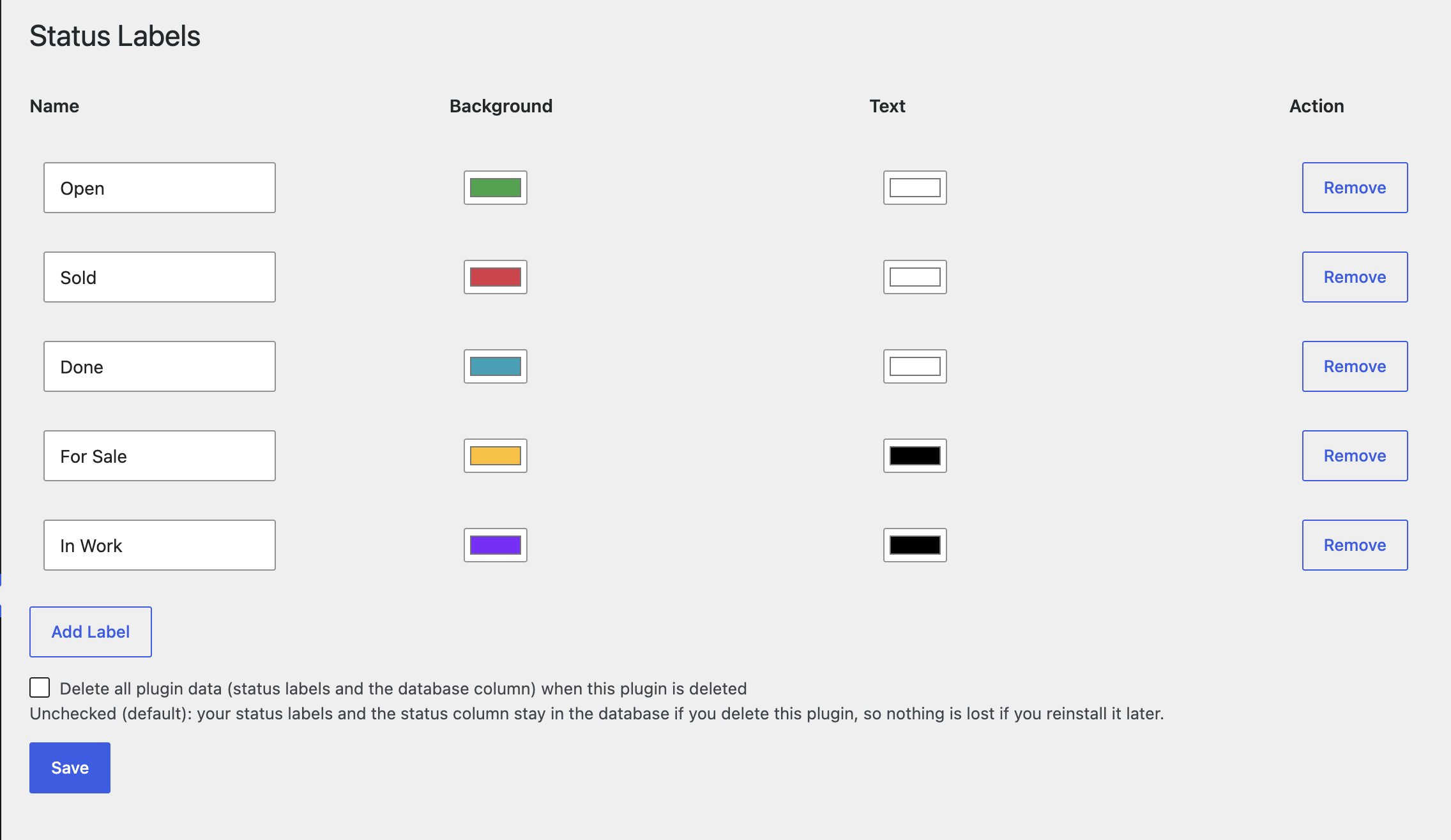
After inserting the functions.php code, another menu item Status Labels is created under Forum.
Since this is primarily for me, the other points are only in German, but could be adapted in the functions.
Hintergrund = Label background color
Schrift = Font color
Aktion Entfernen = Action Remove
Here pages where this is used
But first, a status must be set…
https://www.chopper-motorrad.de/cf/chopperforum/ich-biete/
https://www.chopper-motorrad.de/cf/thema/suzuki-ls650-savage-eintopf-umbau/
I don’t know who Claude is?…
After inserting the functions.php code, another menu item Status Labels is created under Forum.
Since this is primarily for me, the other points are only in German, but could be adapted in the functions.
Hintergrund = Label background color
Schrift = Font color
Aktion Entfernen = Action Remove

Here pages where this is used
But first, a status must be set…

https://www.chopper-motorrad.de/cf/chopperforum/ich-biete/
https://www.chopper-motorrad.de/cf/thema/suzuki-ls650-savage-eintopf-umbau/
Only a biker knows why a dog sticks its head out a car window.
Quote from AlexR80 on July 14, 2026, 9:18 pm@biker,
I use your code to create a wordpress plugin (with Claude AI. its a powerfull AI, the best for the moment)
I have added an option to filter the status of the posts as you can see in my development website (example here : https://dev.saintseiya.fr/asgaros/forum/erg-ertg-terz/ ).
The SQL query was added directly to the plugin installation and the status can be delete when you uninstall the plugin.
Thanks a lot for your idea and your work.
I use your code to create a wordpress plugin (with Claude AI. its a powerfull AI, the best for the moment)
I have added an option to filter the status of the posts as you can see in my development website (example here : https://dev.saintseiya.fr/asgaros/forum/erg-ertg-terz/ ).
The SQL query was added directly to the plugin installation and the status can be delete when you uninstall the plugin.
Thanks a lot for your idea and your work.
Uploaded files: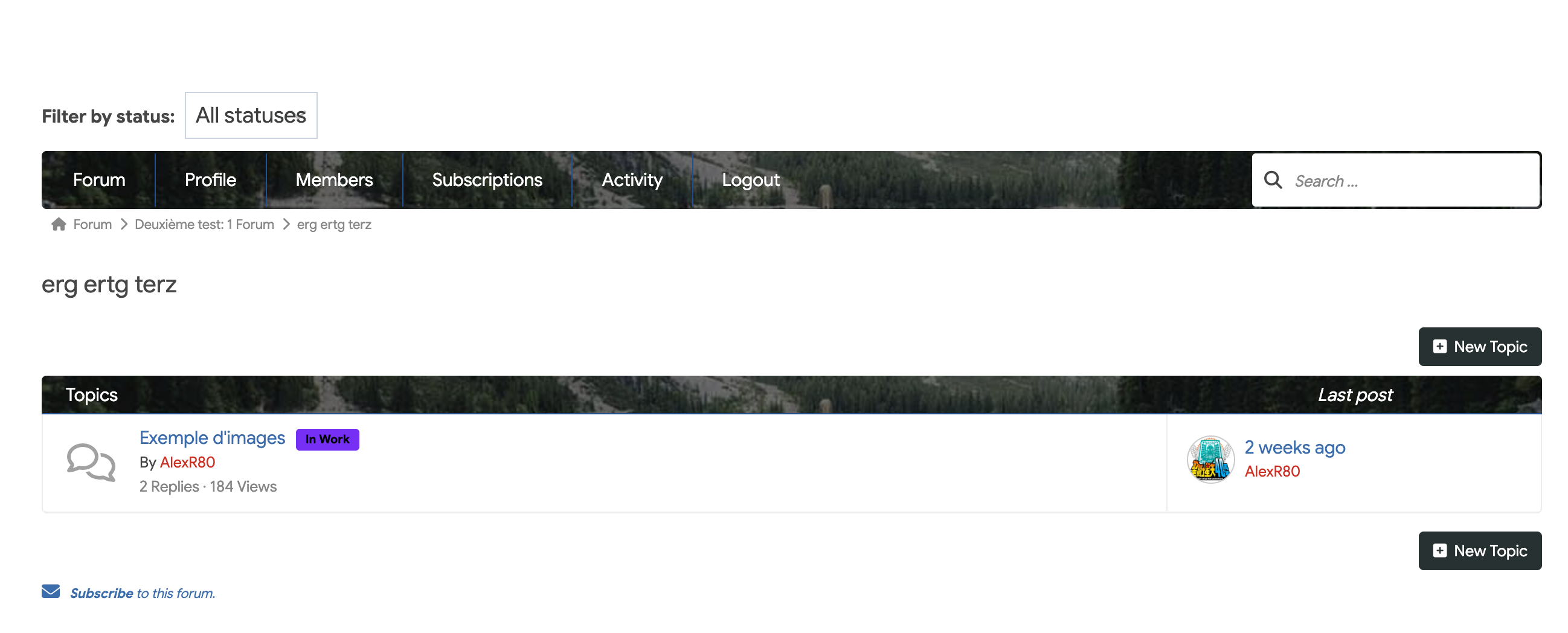
Quote from AlexR80 on July 15, 2026, 10:25 pm@biker, @qualmy91,
I have updated the plugin to 1.7.2 version with minor version
README
=== Asgaros Thread Status Labels ===
Contributors: Biker
Tags: asgaros, forum, status, labels, marketplace
Requires at least: 5.8
Tested up to: 6.7
Requires PHP: 7.4
Stable tag: 1.7.2
License: GPLv2 or later
License URI: https://www.gnu.org/licenses/gpl-2.0.html
Requires Plugins: asgaros-forumAdds colored, fully customizable status labels (e.g. Open, Sold, Reserved) to Asgaros Forum threads.
== Description ==
This add-on for [Asgaros Forum](https://wordpress.org/plugins/asgaros-forum/) lets you attach a status label to any forum topic – useful for classifieds/marketplace-style forums (Open, Sold, Reserved…), support forums (In Progress, Resolved…), or any workflow where a topic needs a visible state.
**Features**
* Fully configurable labels from a dedicated admin screen (Forum > Status Labels): name, background color and text color, as many as you want.
* A status dropdown appears under the editor of any topic – restricted to admins, moderators, and the topic’s own author.
* The current status is shown as a colored badge right next to the topic title on the topic page.
* The same badge appears next to each topic link in a forum’s topic list.
* A status filter dropdown appears above a forum’s topic list, letting visitors instantly narrow the list to a single status (client-side, no page reload), with a live count of topics per status.
* Everything adapts automatically to your site: the real WordPress database prefix, the real URL/permalink structure configured in Asgaros Forum, and the real slug used for topic views – nothing is hardcoded to a specific site.
* The required database column is created automatically when the plugin is activated (and self-heals if Asgaros Forum wasn’t active yet at that time).
* Full translation support, shipped with English (base), French and German admin interfaces.
* Optional cleanup on uninstall: choose whether your labels and the database column should be removed or kept when you delete the plugin.**Requirements**
* [Asgaros Forum](https://wordpress.org/plugins/asgaros-forum/) must be installed and active.
== Installation ==
1. Make sure Asgaros Forum is installed and active.
2. Upload the `asgaros-thread-status` folder to `/wp-content/plugins/`, or install the zip file directly via Plugins > Add New > Upload Plugin.
3. Activate the plugin. The required `status` database column is added automatically.
4. Go to Forum > Status Labels to create your labels (name, background color, text color).
5. Open any topic in edit mode: a “Status” dropdown will appear below the editor for admins, moderators, and the topic’s author.== Frequently Asked Questions ==
= Who can change a topic’s status? =
Site administrators, forum moderators, and the original author of the topic.
= Does this work with any permalink structure? =
Yes. The plugin reads the actual URL slug for topics from your Asgaros Forum settings (Forum > Settings > URLs) instead of assuming a fixed value, so it adapts to whatever structure your site uses.
= What happens to my data if I delete the plugin? =
By default, nothing is removed – your status labels and the database column stay intact so you can reinstall the plugin later without losing anything. If you want a full cleanup instead, check the “Delete all plugin data” option on the Status Labels admin page before deleting the plugin.
= Can I use my own status names, not just the defaults? =
Yes. The default labels (Open, Sold, Done, For Sale) are only a starting point – add, rename, recolor or remove labels freely from Forum > Status Labels. Everything else in the plugin (badges, filter, counts) automatically adapts to whatever labels you define.
== Changelog ==
= 1.7.2 =
* Fixed: The status filter dropdown above a forum’s topic list had no visible arrow on themes that reset native select styling, making it look like a plain box instead of a dropdown. A custom arrow is now forced via CSS regardless of the active theme.= 1.7.1 =
* Fixed: Stable tag in readme.txt was out of sync with the plugin version.
* Fixed: The edit-post URL was matched against a hardcoded slug; it is now read from Asgaros Forum’s own “editpost” view-name setting, so it works regardless of site language or custom URL slugs.
* Fixed: The forum topic list issued two extra database queries per topic to draw its status badges; it now fetches all statuses for the forum in a single query.
* Fixed: The topic-list badge regex could silently fail to match when a topic link contained nested markup (e.g. an icon or span from a theme).
* Changed: The automatic database-column self-healing check now stops retrying after a bounded number of attempts instead of running on every admin page load indefinitely if it can never succeed.= 1.7.0 =
* Added: activation is now blocked if Asgaros Forum is not installed and active (native “Requires Plugins” header for WP 6.5+, with a manual activation check as a fallback for older WordPress versions).
* Added: persistent admin warning if Asgaros Forum is deactivated later while this plugin remains active.= 1.6.0 =
* Security hardening: the status submitted for a topic is now validated against the actual configured labels (rejecting anything else), instead of accepting any sanitized text.
* Security hardening: the automatic database column check/creation is now restricted to administrators (manage_options), instead of running for any logged-in user visiting wp-admin.= 1.5.3 =
* Changed: author set to “Biker” (https://www.chopper-motorrad.de/).= 1.5.2 =
* Fixed: the plugin description shown on the Plugins admin screen is now translatable (was missing from the language files).= 1.5.1 =
* Changed: renamed the plugin from “Asgaros Forum – Thread Status Labels” to “Asgaros Thread Status Labels”.= 1.5.0 =
* Added: option to keep or delete plugin data (labels and the database column) when the plugin is uninstalled.
* Added: uninstall.php handling the cleanup based on that choice.= 1.4.0 =
* Changed: the status badge on a topic page now appears right next to the topic title instead of above the page header.= 1.3.0 =
* Added: live topic count next to each status in the filter dropdown, scoped to the forum being viewed.= 1.2.0 =
* Added: client-side status filter dropdown above a forum’s topic list.
* Fixed: the topic list badge now uses the same display rule as the topic page badge (shown for any status other than “Open”), instead of a separate hardcoded whitelist of status names.= 1.1.0 =
* Added: the required “status” database column is now created automatically on plugin activation, using the real prefix of the current database, with a self-healing retry if Asgaros Forum wasn’t active yet.= 1.0.0 =
* Initial release, packaged as a standalone plugin with English (base), French and German translations.
* Status badges on the topic page and in the forum’s topic list, both based on Asgaros Forum’s own hooks so they adapt automatically to any URL structure.== Upgrade Notice ==
= 1.7.2 =
* Fixed: the status filter dropdown could look like a plain box (no visible arrow) on themes that reset native select styling.= 1.7.1 =
* Fixed: hardcoded German edit-post URL slug, N+1 queries on the topic list, a fragile badge regex, and an unbounded admin-side retry loop. No action required.= 1.7.0 =
* Added: activation is now blocked if Asgaros Forum is not installed and active (native “Requires Plugins” header for WP 6.5+, with a manual activation check as a fallback for older WordPress versions).
* Added: persistent admin warning if Asgaros Forum is deactivated later while this plugin remains active.= 1.6.0 =
* Security hardening: the status submitted for a topic is now validated against the actual configured labels (rejecting anything else), instead of accepting any sanitized text.
* Security hardening: the automatic database column check/creation is now restricted to administrators (manage_options), instead of running for any logged-in user visiting wp-admin.= 1.5.3 =
* Changed: author set to “Biker” (https://www.chopper-motorrad.de/).= 1.5.2 =
* Fixed: the plugin description shown on the Plugins admin screen is now translatable (was missing from the language files).= 1.5.1 =
* Changed: renamed the plugin from “Asgaros Forum – Thread Status Labels” to “Asgaros Thread Status Labels”.= 1.5.0 =
Adds an uninstall data option. No action required – existing installs default to “keep data”, matching previous behavior.
I have updated the plugin to 1.7.2 version with minor version
README
Uploaded files:=== Asgaros Thread Status Labels ===
Contributors: Biker
Tags: asgaros, forum, status, labels, marketplace
Requires at least: 5.8
Tested up to: 6.7
Requires PHP: 7.4
Stable tag: 1.7.2
License: GPLv2 or later
License URI: https://www.gnu.org/licenses/gpl-2.0.html
Requires Plugins: asgaros-forumAdds colored, fully customizable status labels (e.g. Open, Sold, Reserved) to Asgaros Forum threads.
== Description ==
This add-on for [Asgaros Forum](https://wordpress.org/plugins/asgaros-forum/) lets you attach a status label to any forum topic – useful for classifieds/marketplace-style forums (Open, Sold, Reserved…), support forums (In Progress, Resolved…), or any workflow where a topic needs a visible state.
**Features**
* Fully configurable labels from a dedicated admin screen (Forum > Status Labels): name, background color and text color, as many as you want.
* A status dropdown appears under the editor of any topic – restricted to admins, moderators, and the topic’s own author.
* The current status is shown as a colored badge right next to the topic title on the topic page.
* The same badge appears next to each topic link in a forum’s topic list.
* A status filter dropdown appears above a forum’s topic list, letting visitors instantly narrow the list to a single status (client-side, no page reload), with a live count of topics per status.
* Everything adapts automatically to your site: the real WordPress database prefix, the real URL/permalink structure configured in Asgaros Forum, and the real slug used for topic views – nothing is hardcoded to a specific site.
* The required database column is created automatically when the plugin is activated (and self-heals if Asgaros Forum wasn’t active yet at that time).
* Full translation support, shipped with English (base), French and German admin interfaces.
* Optional cleanup on uninstall: choose whether your labels and the database column should be removed or kept when you delete the plugin.**Requirements**
* [Asgaros Forum](https://wordpress.org/plugins/asgaros-forum/) must be installed and active.
== Installation ==
1. Make sure Asgaros Forum is installed and active.
2. Upload the `asgaros-thread-status` folder to `/wp-content/plugins/`, or install the zip file directly via Plugins > Add New > Upload Plugin.
3. Activate the plugin. The required `status` database column is added automatically.
4. Go to Forum > Status Labels to create your labels (name, background color, text color).
5. Open any topic in edit mode: a “Status” dropdown will appear below the editor for admins, moderators, and the topic’s author.== Frequently Asked Questions ==
= Who can change a topic’s status? =
Site administrators, forum moderators, and the original author of the topic.
= Does this work with any permalink structure? =
Yes. The plugin reads the actual URL slug for topics from your Asgaros Forum settings (Forum > Settings > URLs) instead of assuming a fixed value, so it adapts to whatever structure your site uses.
= What happens to my data if I delete the plugin? =
By default, nothing is removed – your status labels and the database column stay intact so you can reinstall the plugin later without losing anything. If you want a full cleanup instead, check the “Delete all plugin data” option on the Status Labels admin page before deleting the plugin.
= Can I use my own status names, not just the defaults? =
Yes. The default labels (Open, Sold, Done, For Sale) are only a starting point – add, rename, recolor or remove labels freely from Forum > Status Labels. Everything else in the plugin (badges, filter, counts) automatically adapts to whatever labels you define.
== Changelog ==
= 1.7.2 =
* Fixed: The status filter dropdown above a forum’s topic list had no visible arrow on themes that reset native select styling, making it look like a plain box instead of a dropdown. A custom arrow is now forced via CSS regardless of the active theme.= 1.7.1 =
* Fixed: Stable tag in readme.txt was out of sync with the plugin version.
* Fixed: The edit-post URL was matched against a hardcoded slug; it is now read from Asgaros Forum’s own “editpost” view-name setting, so it works regardless of site language or custom URL slugs.
* Fixed: The forum topic list issued two extra database queries per topic to draw its status badges; it now fetches all statuses for the forum in a single query.
* Fixed: The topic-list badge regex could silently fail to match when a topic link contained nested markup (e.g. an icon or span from a theme).
* Changed: The automatic database-column self-healing check now stops retrying after a bounded number of attempts instead of running on every admin page load indefinitely if it can never succeed.= 1.7.0 =
* Added: activation is now blocked if Asgaros Forum is not installed and active (native “Requires Plugins” header for WP 6.5+, with a manual activation check as a fallback for older WordPress versions).
* Added: persistent admin warning if Asgaros Forum is deactivated later while this plugin remains active.= 1.6.0 =
* Security hardening: the status submitted for a topic is now validated against the actual configured labels (rejecting anything else), instead of accepting any sanitized text.
* Security hardening: the automatic database column check/creation is now restricted to administrators (manage_options), instead of running for any logged-in user visiting wp-admin.= 1.5.3 =
* Changed: author set to “Biker” (https://www.chopper-motorrad.de/).= 1.5.2 =
* Fixed: the plugin description shown on the Plugins admin screen is now translatable (was missing from the language files).= 1.5.1 =
* Changed: renamed the plugin from “Asgaros Forum – Thread Status Labels” to “Asgaros Thread Status Labels”.= 1.5.0 =
* Added: option to keep or delete plugin data (labels and the database column) when the plugin is uninstalled.
* Added: uninstall.php handling the cleanup based on that choice.= 1.4.0 =
* Changed: the status badge on a topic page now appears right next to the topic title instead of above the page header.= 1.3.0 =
* Added: live topic count next to each status in the filter dropdown, scoped to the forum being viewed.= 1.2.0 =
* Added: client-side status filter dropdown above a forum’s topic list.
* Fixed: the topic list badge now uses the same display rule as the topic page badge (shown for any status other than “Open”), instead of a separate hardcoded whitelist of status names.= 1.1.0 =
* Added: the required “status” database column is now created automatically on plugin activation, using the real prefix of the current database, with a self-healing retry if Asgaros Forum wasn’t active yet.= 1.0.0 =
* Initial release, packaged as a standalone plugin with English (base), French and German translations.
* Status badges on the topic page and in the forum’s topic list, both based on Asgaros Forum’s own hooks so they adapt automatically to any URL structure.== Upgrade Notice ==
= 1.7.2 =
* Fixed: the status filter dropdown could look like a plain box (no visible arrow) on themes that reset native select styling.= 1.7.1 =
* Fixed: hardcoded German edit-post URL slug, N+1 queries on the topic list, a fragile badge regex, and an unbounded admin-side retry loop. No action required.= 1.7.0 =
* Added: activation is now blocked if Asgaros Forum is not installed and active (native “Requires Plugins” header for WP 6.5+, with a manual activation check as a fallback for older WordPress versions).
* Added: persistent admin warning if Asgaros Forum is deactivated later while this plugin remains active.= 1.6.0 =
* Security hardening: the status submitted for a topic is now validated against the actual configured labels (rejecting anything else), instead of accepting any sanitized text.
* Security hardening: the automatic database column check/creation is now restricted to administrators (manage_options), instead of running for any logged-in user visiting wp-admin.= 1.5.3 =
* Changed: author set to “Biker” (https://www.chopper-motorrad.de/).= 1.5.2 =
* Fixed: the plugin description shown on the Plugins admin screen is now translatable (was missing from the language files).= 1.5.1 =
* Changed: renamed the plugin from “Asgaros Forum – Thread Status Labels” to “Asgaros Thread Status Labels”.= 1.5.0 =
Adds an uninstall data option. No action required – existing installs default to “keep data”, matching previous behavior.