
no edit button for guest although settings enable it + login issue

Quote from 123 on May 28, 2019, 7:20 pmhi, thank you in advance to any who takes the time to answer!
1.kindly see attached screen shots:
setting: Users can edit their own posts + 0 minutes [and i saved it] but still no button: how can i resolve that?2.a second matter: the WP login is a nightmare and a sure way to scare off non-techies = my clients profile exactly.
this is why, with no option other to look for another forum plugin that has it’s own registration – a drag as i’ve already set everything up with asgaros [which is a great tool, and i read here somewhere thomas will be adding that in the future – is there an estimate?], i’ve had to make a *huge* business/marketing: unchecked all the boxes in setting that have to do with registration = loss of all potential emails for my email list.however, now that i’ve logged in for a second time to this forum, i immediately got to it –
is this the way it is? i.e. you only have to go through the nightmare once?
this is crucial to me because if so – maybe i can prepare some screen shots to show exactly what to do and reassure prospects it’s only this one time…?so: is it always so? + how did you guys resolve this issue?
3. what is the difference between the “reply” button above the new topic/post and beneath?
4. my name is long and as admin, it breaks = the last letter is pushed to a second line – can i control that column’s width?
have a great one everybody
hi, thank you in advance to any who takes the time to answer!
1.kindly see attached screen shots:
setting: Users can edit their own posts + 0 minutes [and i saved it] but still no button: how can i resolve that?
2.a second matter: the WP login is a nightmare and a sure way to scare off non-techies = my clients profile exactly.
this is why, with no option other to look for another forum plugin that has it’s own registration – a drag as i’ve already set everything up with asgaros [which is a great tool, and i read here somewhere thomas will be adding that in the future – is there an estimate?], i’ve had to make a *huge* business/marketing: unchecked all the boxes in setting that have to do with registration = loss of all potential emails for my email list.
however, now that i’ve logged in for a second time to this forum, i immediately got to it –
is this the way it is? i.e. you only have to go through the nightmare once?
this is crucial to me because if so – maybe i can prepare some screen shots to show exactly what to do and reassure prospects it’s only this one time…?
so: is it always so? + how did you guys resolve this issue?
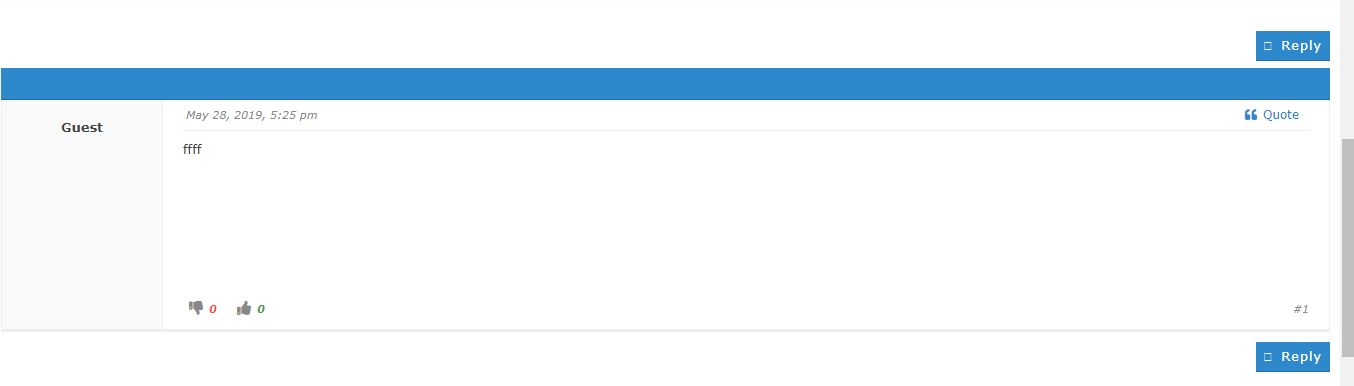
3. what is the difference between the “reply” button above the new topic/post and beneath?
4. my name is long and as admin, it breaks = the last letter is pushed to a second line – can i control that column’s width?
have a great one everybody
Uploaded files: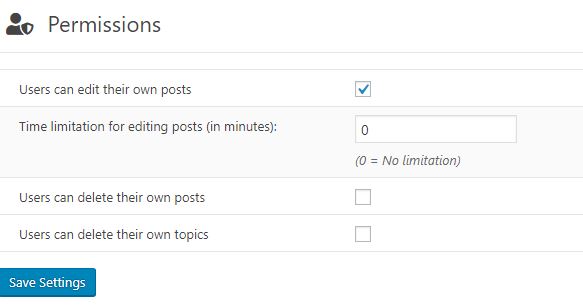

Quote from Asgaros on May 28, 2019, 7:58 pmHello @123
The editing-permission is only available for logged-in users. The forum does not capture any IP or other data which can be used for identification-purposes (which would be compliant to privacy-laws). Because of this its not possible to connect individual guest-postings to a unique guest. Otherwise every guest could edit every other guest-post within X minutes.
Login-screen: Asgaros Forum uses the default login/registration implementation by WordPress to ensure that other third-party plugins can still be used. This would be not possible anymore if Asgaros Forum would have its own implementation as long as those plugins dont add integration-functionality for Asgaros Forum.
However, there are plugins out there which can be used to completely modify the login/registration pages. If you use such a plugin, you can change the link pointing to your own login-page easily as described here:
https://asgaros.com/support/topic/change-urls-login-register-profile-etc/
Reply buttons: There is no difference between them. Those two buttons just ensure, that a user doesnt have to scroll completely up or down inside of topics with multiple posts to create a new reply.
Column width: You can easily change the style (width, colors, etc) of certain elements with custom css-code. If you tell me exactly which column you mean (post, last-post, etc) I can provide you an example code-snippet.
Hello @123
The editing-permission is only available for logged-in users. The forum does not capture any IP or other data which can be used for identification-purposes (which would be compliant to privacy-laws). Because of this its not possible to connect individual guest-postings to a unique guest. Otherwise every guest could edit every other guest-post within X minutes.
Login-screen: Asgaros Forum uses the default login/registration implementation by WordPress to ensure that other third-party plugins can still be used. This would be not possible anymore if Asgaros Forum would have its own implementation as long as those plugins dont add integration-functionality for Asgaros Forum.
However, there are plugins out there which can be used to completely modify the login/registration pages. If you use such a plugin, you can change the link pointing to your own login-page easily as described here:
https://asgaros.com/support/topic/change-urls-login-register-profile-etc/
Reply buttons: There is no difference between them. Those two buttons just ensure, that a user doesnt have to scroll completely up or down inside of topics with multiple posts to create a new reply.
Column width: You can easily change the style (width, colors, etc) of certain elements with custom css-code. If you tell me exactly which column you mean (post, last-post, etc) I can provide you an example code-snippet.
Quote from 123 on May 28, 2019, 8:16 pmgot it thank you!
you are most patient, knowledgeable and kind!
- Column width: where the name is in the reply/post forum: see attached
2. also regarding the login: is it indeed just for the first time? because now i got directly in without doing a thing
3. sorry, two more : i can’t find where to manage admin’s profile. maybe because i disables “profiles” [because of the wp login issue]? i thought it was for users only… i’d like to add photo + my email is showing under my name when i post [@mail] and i want to hide it…
4. so ALL admin activity is done front end while logged in to wp yes?
got it thank you!
you are most patient, knowledgeable and kind!
- Column width: where the name is in the reply/post forum: see attached
2. also regarding the login: is it indeed just for the first time? because now i got directly in without doing a thing
3. sorry, two more : i can’t find where to manage admin’s profile. maybe because i disables “profiles” [because of the wp login issue]? i thought it was for users only… i’d like to add photo + my email is showing under my name when i post [@mail] and i want to hide it…
4. so ALL admin activity is done front end while logged in to wp yes?
Uploaded files: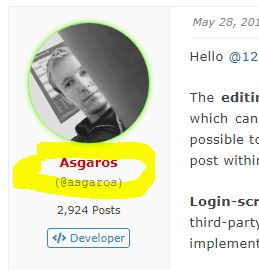
Quote from Asgaros on May 28, 2019, 9:49 pmHello @123
You can add the following code to Forum -> Appearance -> Custom CSS to increase the width of this column:
#af-wrapper .post-author {
    width: 250px;
}
Login: Normally WordPress keeps you logged-in for a while or as long as you log-out.
Profile: You can manage your profile by visiting the backend of your WordPress-site (my-site.com/wp-admin). The gray area below the username is the unique identifier used for the mentioning-functionality. You can hide this by disabling the mentioning-functionality in Forum -> Settings -> Mentioning.
so ALL admin activity is done front end while logged in to wp yes?
Exactly, except of administrative things like changing the general forum-settings or changing user-roles. For this you have to go to the backend.
Hello @123
You can add the following code to Forum -> Appearance -> Custom CSS to increase the width of this column:
#af-wrapper .post-author {
    width: 250px;
}
Login: Normally WordPress keeps you logged-in for a while or as long as you log-out.
Profile: You can manage your profile by visiting the backend of your WordPress-site (my-site.com/wp-admin). The gray area below the username is the unique identifier used for the mentioning-functionality. You can hide this by disabling the mentioning-functionality in Forum -> Settings -> Mentioning.
so ALL admin activity is done front end while logged in to wp yes?
Exactly, except of administrative things like changing the general forum-settings or changing user-roles. For this you have to go to the backend.
Quote from 123 on May 28, 2019, 10:17 pm
- wow it worked perfectly: my name now shows fully – thank you!!!! (i feel like such an expert using code like that :-))))
2. now i see the registration is actually not to the forum but to the site… so this is why it’s through wp. hmmm.
wieder vielen dank, gute nacht
- wow it worked perfectly: my name now shows fully – thank you!!!! (i feel like such an expert using code like that :-))))
2. now i see the registration is actually not to the forum but to the site… so this is why it’s through wp. hmmm.
wieder vielen dank, gute nacht