
Login Pop-up and Awesome Font Issues

Quote from Grover on December 17, 2021, 12:16 amHi,
On my page there are two issues that have occured today:
- The Login Header is showing as code vs. as links
- I updated one of the Forum Icons and now it shows blank. This happened with multiple Awesome Font v4/5 icons.
What can I do to correct these issues?
Thank you
Hi,
On my page there are two issues that have occured today:
- The Login Header is showing as code vs. as links
- I updated one of the Forum Icons and now it shows blank. This happened with multiple Awesome Font v4/5 icons.
What can I do to correct these issues?
Thank you
Uploaded files: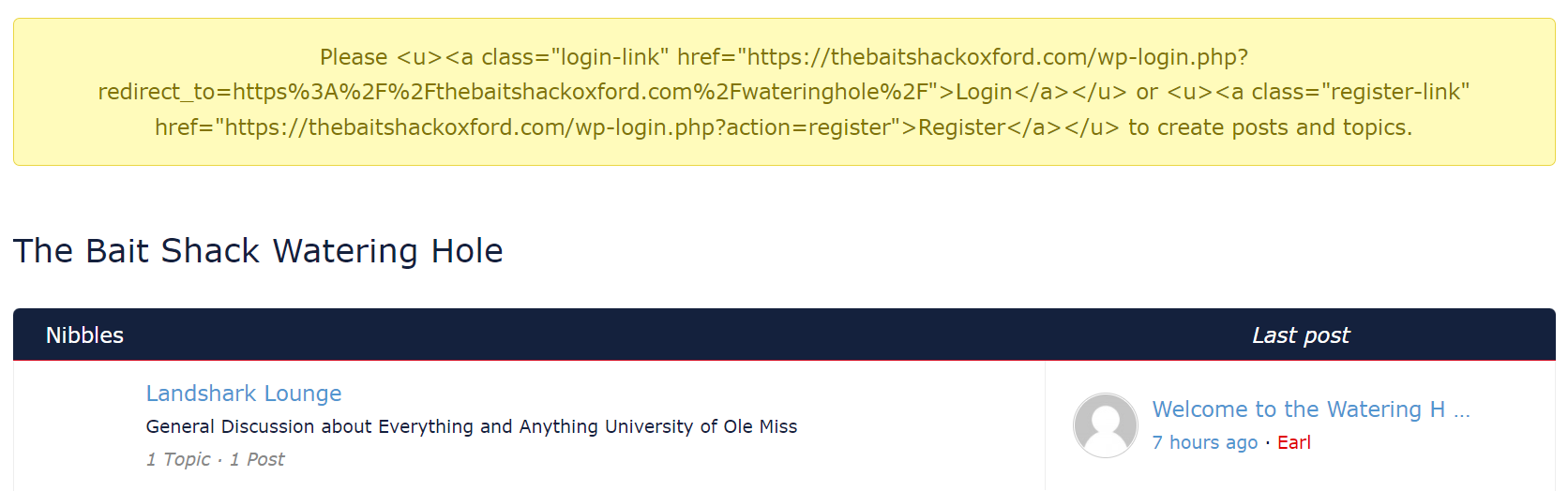
Quote from Grover on December 17, 2021, 12:18 amI also noticed the login issue on this page prior to signing in. Is there an issue with the Asgaros servers today?
My issue above showed on a desktop, iphone, and android browser.
I also noticed the login issue on this page prior to signing in. Is there an issue with the Asgaros servers today?
My issue above showed on a desktop, iphone, and android browser.
Uploaded files: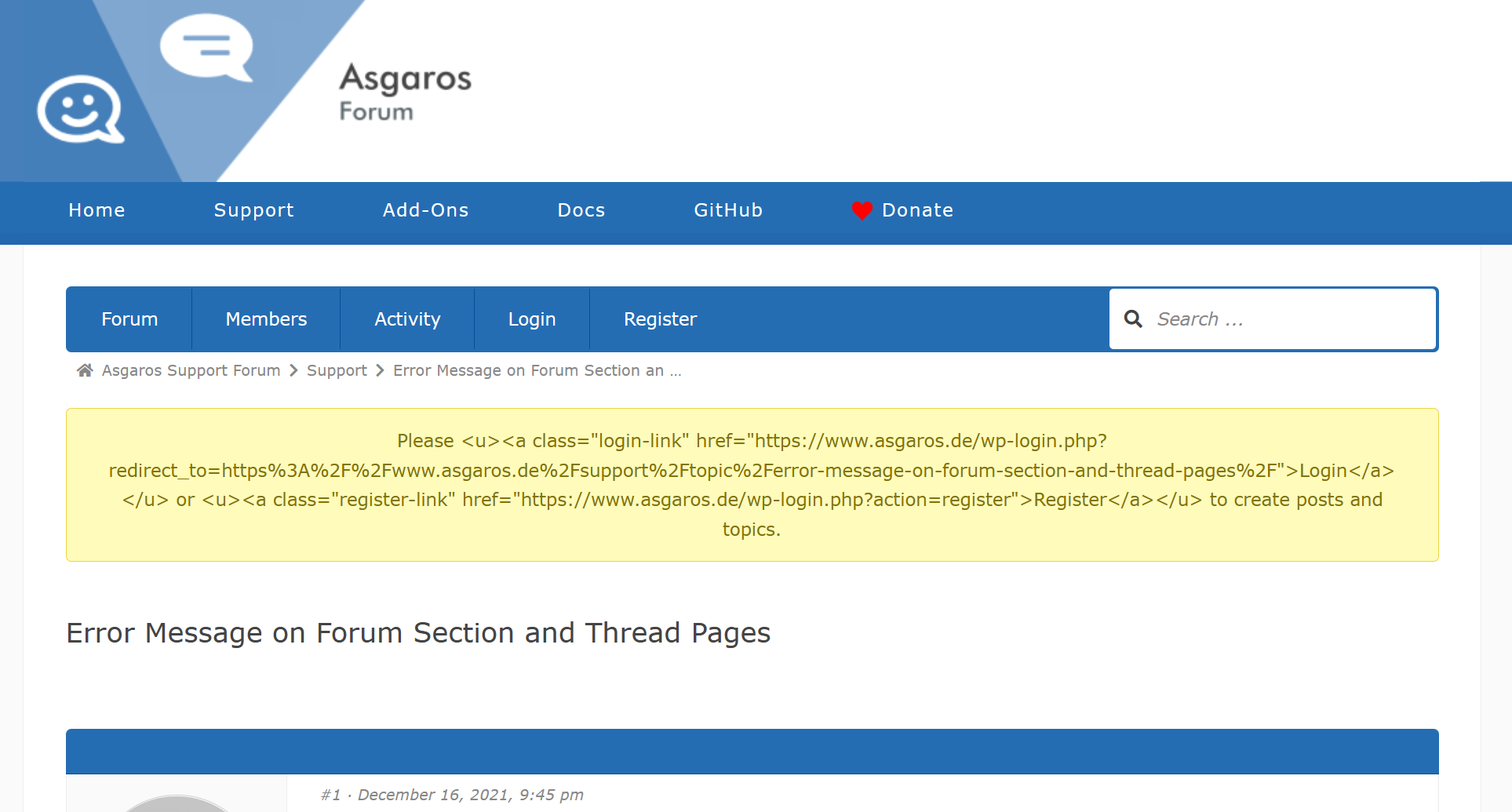

Quote from jtegtmei on December 17, 2021, 10:45 amI noticed the second issue as well prior to login to the Asgaros Forum and I have the same issue with my own forum
I noticed the second issue as well prior to login to the Asgaros Forum and I have the same issue with my own forum

Quote from Grover on December 18, 2021, 7:07 amUpdating to the new version fixed my Login/Registration window to show hyperlinks vs. code.
The issue I am still having is that the Awesome Font Icons do not show.
What I have noticed is that I can enter the Edit Forum and put the Icon Code where it says “Icon;” and click save. The icon does not appear, when I click Edit Forum again I notice the space between FAS & FA is removed so rather than it being “fas fa-fish” it shows as “fasfa-fish” so something is removing the space somewhere and I’m lost as to where to find where to fix this.
Updating to the new version fixed my Login/Registration window to show hyperlinks vs. code.
The issue I am still having is that the Awesome Font Icons do not show.
What I have noticed is that I can enter the Edit Forum and put the Icon Code where it says “Icon;” and click save. The icon does not appear, when I click Edit Forum again I notice the space between FAS & FA is removed so rather than it being “fas fa-fish” it shows as “fasfa-fish” so something is removing the space somewhere and I’m lost as to where to find where to fix this.

Quote from Clara Crazy on December 18, 2021, 1:55 pmQuote from Grover on December 18, 2021, 7:07 amUpdating to the new version fixed my Login/Registration window to show hyperlinks vs. code.
The issue I am still having is that the Awesome Font Icons do not show.
What I have noticed is that I can enter the Edit Forum and put the Icon Code where it says “Icon;” and click save. The icon does not appear, when I click Edit Forum again I notice the space between FAS & FA is removed so rather than it being “fas fa-fish” it shows as “fasfa-fish” so something is removing the space somewhere and I’m lost as to where to find where to fix this.
Having the exact same issue. @asgaros any fix for this?
Quote from Grover on December 18, 2021, 7:07 amUpdating to the new version fixed my Login/Registration window to show hyperlinks vs. code.
The issue I am still having is that the Awesome Font Icons do not show.
What I have noticed is that I can enter the Edit Forum and put the Icon Code where it says “Icon;” and click save. The icon does not appear, when I click Edit Forum again I notice the space between FAS & FA is removed so rather than it being “fas fa-fish” it shows as “fasfa-fish” so something is removing the space somewhere and I’m lost as to where to find where to fix this.
Having the exact same issue. @asgaros any fix for this?


Quote from roeda on December 18, 2021, 4:37 pmSame problem on our page after updating to 1.15.17.
Icons disappear after saving. When I leave the icon field blank, it saves the pre-defined fas fa-comments.
I took a look at the code (and compared it to a previous version) but still have no clue how to fix it. Seems like <input> for this field saves it to the database, ignoring whitespace.
@asgaros Big applause for developing and maintaining this plugin! Please have a look at this issue, might be a minor bug.
thanks.
Same problem on our page after updating to 1.15.17.
Icons disappear after saving. When I leave the icon field blank, it saves the pre-defined fas fa-comments.
I took a look at the code (and compared it to a previous version) but still have no clue how to fix it. Seems like <input> for this field saves it to the database, ignoring whitespace.
@asgaros Big applause for developing and maintaining this plugin! Please have a look at this issue, might be a minor bug.
thanks.
Quote from Grover on December 18, 2021, 9:12 pm
fas fa-motorcycle
Yes, thank you for attempting to answer this. However, these have been selected and I am still running into this issue.
Something over the past 48 hours has created the issue I’ve referenced as any icons I previously added are fine. It’s only new ones that are having the issue of the space removed.
fas fa-motorcycle
Yes, thank you for attempting to answer this. However, these have been selected and I am still running into this issue.
Something over the past 48 hours has created the issue I’ve referenced as any icons I previously added are fine. It’s only new ones that are having the issue of the space removed.