
Line Spacing Issue

Quote from dbparke on January 19, 2021, 12:52 amHaving an issue. When I post a message, even on this forum my line spacing is double.
As you can see above. I’ve previously tried 2 win10 computers, 3 browsers and still the same results..
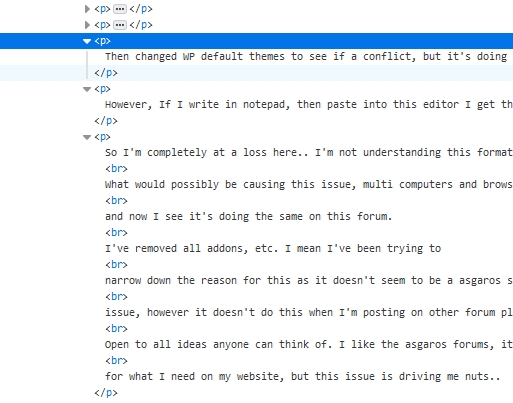
Then changed WP default themes to see if a conflict, but it’s doing the same as I write this post here…
However, If I write in notepad, then paste into this editor I get these results without the double line spacing:
So I’m completely at a loss here.. I’m not understanding this formatting issue.
What would possibly be causing this issue, multi computers and browsers, themes
and now I see it’s doing the same on this forum.
I’ve removed all addons, etc. I mean I’ve been trying to
narrow down the reason for this as it doesn’t seem to be a asgaros specific
issue, however it doesn’t do this when I’m posting on other forum platforms.
Open to all ideas anyone can think of. I like the asgaros forums, it works perfect
for what I need on my website, but this issue is driving me nuts..
Having an issue. When I post a message, even on this forum my line spacing is double.
As you can see above. I’ve previously tried 2 win10 computers, 3 browsers and still the same results..
Then changed WP default themes to see if a conflict, but it’s doing the same as I write this post here…
However, If I write in notepad, then paste into this editor I get these results without the double line spacing:
So I’m completely at a loss here.. I’m not understanding this formatting issue.
What would possibly be causing this issue, multi computers and browsers, themes
and now I see it’s doing the same on this forum.
I’ve removed all addons, etc. I mean I’ve been trying to
narrow down the reason for this as it doesn’t seem to be a asgaros specific
issue, however it doesn’t do this when I’m posting on other forum platforms.
Open to all ideas anyone can think of. I like the asgaros forums, it works perfect
for what I need on my website, but this issue is driving me nuts..

Quote from Veronica on January 19, 2021, 1:18 amTry to hold the shift button and click enter button will give a line break.
Enter button single will give a new paragraph ie the double spacing.
Try to hold the shift button and click enter button will give a line break.
Enter button single will give a new paragraph ie the double spacing.
Quote from dbparke on January 19, 2021, 1:34 amHi Veronica,
Thank You, That works.
I guess thats just a thing now with wordpress Gutenberg editors.
I’ll have to get use to it, or replace gutenberg with wp default editor..Mystery solved.. Thank you so much..
Hi Veronica,
Thank You, That works.
I guess thats just a thing now with wordpress Gutenberg editors.
I’ll have to get use to it, or replace gutenberg with wp default editor..
Mystery solved.. Thank you so much..

Quote from Asgaros on February 17, 2021, 8:04 amHello @dbparke
Just a quick follow-up: This is also a normal behavior with the previous WordPress TinyMCE-editor which is used inside of the forum. 🙂
Hello @dbparke
Just a quick follow-up: This is also a normal behavior with the previous WordPress TinyMCE-editor which is used inside of the forum. 🙂