
Cannot display post container content

Quote from klkoh on March 30, 2021, 5:16 pmHello, basically every post in my forum is not showing, and I believe this is the reason (see attachment).
Any idea how I can overwrite this? Is it via the Asgaros settings or the theme’s CSS? I can’t seem to find the option in either one.
Thanks in advance!
Hello, basically every post in my forum is not showing, and I believe this is the reason (see attachment).
Any idea how I can overwrite this? Is it via the Asgaros settings or the theme’s CSS? I can’t seem to find the option in either one.
Thanks in advance!
Uploaded files: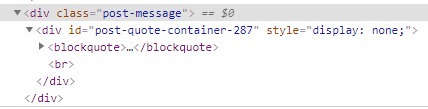

Quote from qualmy91 on March 31, 2021, 7:43 amHey @klkoh,
can you please share the URL of your forum so I can have a look.
Hey @klkoh,
can you please share the URL of your forum so I can have a look.
Quote from klkoh on April 4, 2021, 2:57 pmHi @qualmy91, this has been fixed, thanks! But we have ran into another 2 problems:
- “There has been a critical error on this website” message showing with post-message if user is not logged in (if user is logged in, it is fine, but it reflects very bad on our site to show this regardless).
- The replies do not appear (if you click one level higher at the breadcrumbs area, you will see that the latest author is different).
The url that this happens is here (and basically for any forum topic on the site).
Logs: from when I took over for my client, I have adjusted some code in post-element.php and script.js to solve: (i) the above error and (ii) another error where reply button becomes display:none when clicking “Quote”
thanks again in advance
Hi @qualmy91, this has been fixed, thanks! But we have ran into another 2 problems:
- “There has been a critical error on this website” message showing with post-message if user is not logged in (if user is logged in, it is fine, but it reflects very bad on our site to show this regardless).
- The replies do not appear (if you click one level higher at the breadcrumbs area, you will see that the latest author is different).
The url that this happens is here (and basically for any forum topic on the site).
Logs: from when I took over for my client, I have adjusted some code in post-element.php and script.js to solve: (i) the above error and (ii) another error where reply button becomes display:none when clicking “Quote”
thanks again in advance
Quote from qualmy91 on April 5, 2021, 3:12 amHey @klkoh,
- “There has been a critical error on this website” message showing with post-message if user is not logged in (if user is logged in, it is fine, but it reflects very bad on our site to show this regardless).
are you talking about the info “You need to log in to create posts and topics.”? Because I can’t see any critical error on this page. If you got a critical error, please share the error log so I can check it.
- The replies do not appear (if you click one level higher at the breadcrumbs area, you will see that the latest author is different).
Sorry, I don’t really understand that. Can you please give me some further information?
Logs: from when I took over for my client, I have adjusted some code in post-element.php and script.js to solve: (i) the above error and (ii) another error where reply button becomes display:none when clicking “Quote”
So did you already fix these two problems? How does this custom code look like? And What is the new error? And what do you want to know from me? I’m a bit confused.
Hey @klkoh,
- “There has been a critical error on this website” message showing with post-message if user is not logged in (if user is logged in, it is fine, but it reflects very bad on our site to show this regardless).
are you talking about the info “You need to log in to create posts and topics.”? Because I can’t see any critical error on this page. If you got a critical error, please share the error log so I can check it.
- The replies do not appear (if you click one level higher at the breadcrumbs area, you will see that the latest author is different).
Sorry, I don’t really understand that. Can you please give me some further information?
Logs: from when I took over for my client, I have adjusted some code in post-element.php and script.js to solve: (i) the above error and (ii) another error where reply button becomes display:none when clicking “Quote”
So did you already fix these two problems? How does this custom code look like? And What is the new error? And what do you want to know from me? I’m a bit confused.
Quote from klkoh on April 5, 2021, 5:28 amHi @qualmy91, sorry again, one of our programmers have fixed the issue between my post and your reply.
I really appreciate the time you took to help look at the website.
Hi @qualmy91, sorry again, one of our programmers have fixed the issue between my post and your reply.
I really appreciate the time you took to help look at the website.