
Add content in the profile page

Quote from andreasml on June 7, 2021, 11:22 amHi
I would like to add some more info on the profile page of each member. In fact I would like to add the surname and the nickname. I assume that I have to use the hook asgarosforum_custom_profile_content but I am not quite sure how to do it.
Could you please give me a hint?
Regards,
Andreas Lazaris
Hi
I would like to add some more info on the profile page of each member. In fact I would like to add the surname and the nickname. I assume that I have to use the hook asgarosforum_custom_profile_content but I am not quite sure how to do it.
Could you please give me a hint?
Regards,
Andreas Lazaris
Quote from andreasml on June 8, 2021, 7:58 pmHi
Here is how I did it.
- I found the file forum-profile.php in the Asgaros forum plugin (includes>forum-profile.php).
- After the first name code, I added the following code:
// Show last name.
if (!empty($userData->last_name)) {
$profileRows['last_name'] = array(
'title' => __('Last Name:', 'asgaros-forum'),
'value' => $userData->last_name
);
}

// Show Nickname.
if (!empty($userData->nickname)) {
$profileRows['nickname'] = array(
'title' => __('Nickname:', 'asgaros-forum'),
'value' => '@'.$userData->nickname
);
}
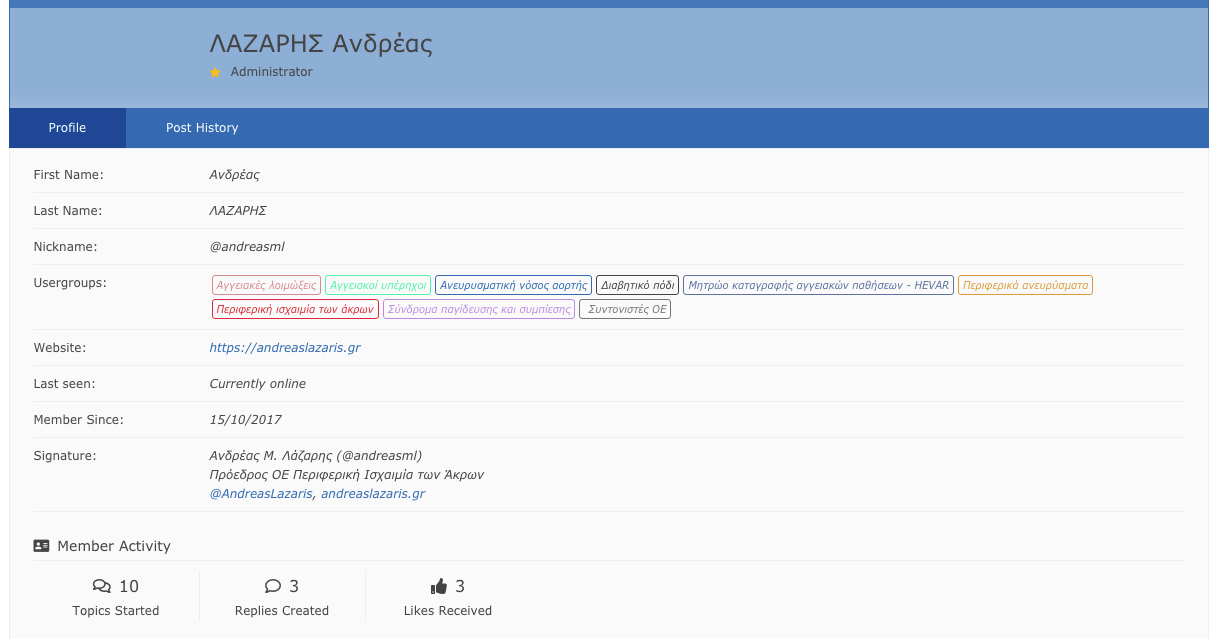
// Show last name. if (!empty($userData->last_name)) { $profileRows['last_name'] = array( 'title' => __('Last Name:', 'asgaros-forum'), 'value' => $userData->last_name ); } // Show Nickname. if (!empty($userData->nickname)) { $profileRows['nickname'] = array( 'title' => __('Nickname:', 'asgaros-forum'), 'value' => '@'.$userData->nickname ); } // Show Email. if (!empty($userData->user_email)) { $profileRows['email'] = array( 'title' => __('Email:', 'asgaros-forum'), 'value' => $userData->user_email ); }Now, all info, First Name, Last Name and Nickname are shown in the profile page. You can have a look at the attached image.
Andreas Lazaris
Hi
Here is how I did it.
- I found the file forum-profile.php in the Asgaros forum plugin (includes>forum-profile.php).
- After the first name code, I added the following code:
// Show last name.
if (!empty($userData->last_name)) {
$profileRows['last_name'] = array(
'title' => __('Last Name:', 'asgaros-forum'),
'value' => $userData->last_name
);
}
// Show Nickname.
if (!empty($userData->nickname)) {
$profileRows['nickname'] = array(
'title' => __('Nickname:', 'asgaros-forum'),
'value' => '@'.$userData->nickname
);
}
        // Show last name.
if (!empty($userData->last_name)) {
$profileRows['last_name'] = array(
'title' => __('Last Name:', 'asgaros-forum'),
'value' => $userData->last_name
);
}

// Show Nickname.
if (!empty($userData->nickname)) {
$profileRows['nickname'] = array(
'title' => __('Nickname:', 'asgaros-forum'),
'value' => '@'.$userData->nickname
);
}

  // Show Email.
if (!empty($userData->user_email)) {
$profileRows['email'] = array(
'title' => __('Email:', 'asgaros-forum'),
'value' => $userData->user_email
);
}
Now, all info, First Name, Last Name and Nickname are shown in the profile page. You can have a look at the attached image.
Andreas Lazaris
Uploaded files:

Quote from qualmy91 on June 18, 2021, 6:41 amHey @andreasml,
if you want to add or customize the existing profile rows you will have to use the filter
asgarosforum_filter_profile_rowand it should work. With your approach, you will lose all the changes with the next update. This hook is already documented here:https://github.com/Asgaros/asgaros-forum/blob/master/hooks.md#asgarosforum_filter_profile_row
Hey @andreasml,
if you want to add or customize the existing profile rows you will have to use the filter asgarosforum_filter_profile_row and it should work. With your approach, you will lose all the changes with the next update. This hook is already documented here:
https://github.com/Asgaros/asgaros-forum/blob/master/hooks.md#asgarosforum_filter_profile_row
Quote from andreasml on June 18, 2021, 9:14 pmHi @qualmy91,
Thank you for your response. I am not quite sure how I can use the filter.
Regards,
Andreas
Hi @qualmy91,
Thank you for your response. I am not quite sure how I can use the filter.
Regards,
Andreas